
Introduction – My Personal Story
Droven.io Tutorial 2026: How to Create Your First AI Agent in 10 Minutes. In this Droven.io Tutorial 2026 guide, I will show you step by step how I created my first AI Agent for Tech Fair Hustle without any coding.
I love creating content and researching new AI tools, but I had no time for that because my whole day was wasted on routine work. I thought this is just part of business and everyone has to do it. I tried hiring a virtual assistant, but it was too expensive for me as a small blogger from Pakistan.
Then about 3 months ago, a friend who is also a freelancer told me about Droven.io. At first, I thought it would be just like Zapier or Make.com, which I had already tried. Those tools are good, but they are very basic and just move data from one app to another. They don’t think. But when I actually signed up and used Droven.io for the first time, I realized it is completely different and way ahead of them. It doesn’t just do automation, it actually thinks, understands context, and makes decisions like a human.
In this detailed tutorial, I will share my honest personal experience and show you how you can create your first AI Agent in just 10 minutes, even if you have zero coding knowledge. I will explain everything in very simple English, step by step, just like I would explain to my own brother. So let’s start.
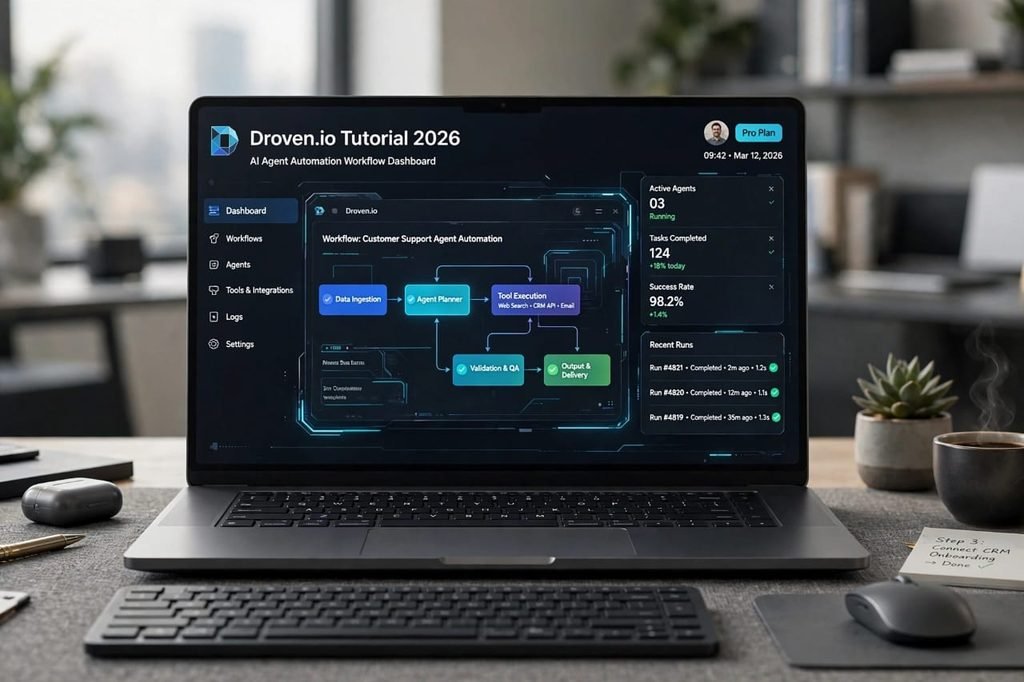
Table of Contents
What is Droven.io? Explained in Simple Words
If you are new to AI automation, let me explain Droven.io in the simplest way possible. Think of Droven.io as a super-intelligent employee who never gets tired, never asks for a salary hike, never takes a day off, and works 24 hours a day, 7 days a week for you.
Let’s take a real-life example so you understand better. Suppose you have a small online shop on Shopify or WooCommerce. Whenever a new order comes in, you have to do at least three to four tasks manually. First, you have to send a personalized thank you message to the customer.
Second, you have to write their name, email, and order details into a Google Sheet for your records. Third, you have to inform your team on Slack or WhatsApp that a new order has arrived. And fourth, you have to create a shipping label. If you get 20 orders a day, doing these 4 tasks 20 times means 80 manual tasks. This can easily waste 2 to 3 hours of your precious time every single day.
Droven.io does all these tasks automatically in the background. You just have to tell it once, in plain English, what you want it to do when a new order comes. You can say, “When a new Shopify order arrives, send a thank you email, add data to Google Sheet, and notify me on Slack.” And that’s it. After that, you can forget about it. It will keep doing it perfectly every single time without any mistake.
What is the main difference between Droven.io and other tools like Zapier? This is the most important point. Zapier and Make are like a laborer or a postman. They only follow a fixed order: If this happens, then do that. They don’t think. But Droven.io is like a smart manager. It uses advanced AI to understand the situation and context.
For example, if a customer sends an angry email saying “Where is my parcel, it’s been 10 days?”, Zapier would send the same generic reply. But Droven.io’s AI Agent will read the emotion, understand the customer is angry, and will reply in a very soft, polite, and apologetic tone, like “I am really sorry for the delay, let me check your order right now.” This human-like thinking is what makes Droven.io so powerful in 2026.
Who is Droven.io For? Is It For You?
This is a very important question you should ask before using any tool. Droven.io is not for everyone, but according to my 3 months of personal experience, it is absolutely perfect for these types of people:
- Small Business Owners: If you are running a small business and you don’t have a big team to handle customer support, lead management, and data entry, then Droven.io is your best friend. It works like 3 employees at the cost of one.
- Freelancers Working on Upwork and Fiverr: If you are a freelancer, you know how important it is to reply to clients quickly. I have created an agent that automatically replies to new client inquiries on Gmail and Upwork within 2 minutes, even when I am sleeping. This has increased my client response rate a lot.
- Students and Researchers: If you are a student, you can automate your assignments, research summaries, email management, and even note-taking. For example, you can create an agent that automatically summarizes any long research article and saves it to your Notion.
- Bloggers, YouTubers, and Content Creators Like Me: For people like us who run Tech Fair Hustle type websites, we get so many emails, comments, and social media messages. I use Droven.io to manage all my blog comments, auto-share my new posts on social media, and organize my content ideas in Trello.
If you belong to any of these categories, then believe me, this tool is made exactly for you.
Step 1: How to Create an Account on Droven.io
This is the easiest step and will take less than 2 minutes. Let me walk you through it.
First, go to Google and type Droven.io. Please make sure you type the correct spelling: D-R-O-V-E-N dot IO. The first website that appears is the official one. Click on it. Be careful because many people type it wrong like Doven or Drowen and end up on the wrong website.
After the website opens, you will see a clean and modern homepage. On the top right corner, you will see a button called “Start for Free” or “Sign Up”. Click on that button.
Now you will get two options to sign up. One is with your Google account, and the second is with your email and password. My personal advice is to sign up with your Google account. It is much faster, more secure, and you don’t have to remember another password. I also did the same.
After signing up, Droven.io will ask you 2-3 simple onboarding questions, like what do you want to use it for, what is your company size, and what is your main role. Just select Small Business or Solo Entrepreneur and Content Creator. Don’t worry, this is just for personalization.
Once you complete this, your main dashboard will open. In the beginning, the dashboard will look a bit empty and new, with no agents created. But don’t get confused or worried. It is designed to be very clean. I will explain everything in the next step.
Step 2: Creating Your First AI Agent – The Most Important Part
This is the core part of this whole tutorial and the reason you opened this article. So please read this carefully. I will explain it with my own real example.
On your dashboard, on the left sidebar, you will see an option called “Agents”. Click on it. Then on the top right, you will see a big blue button called “Create New Agent”. Click on that.
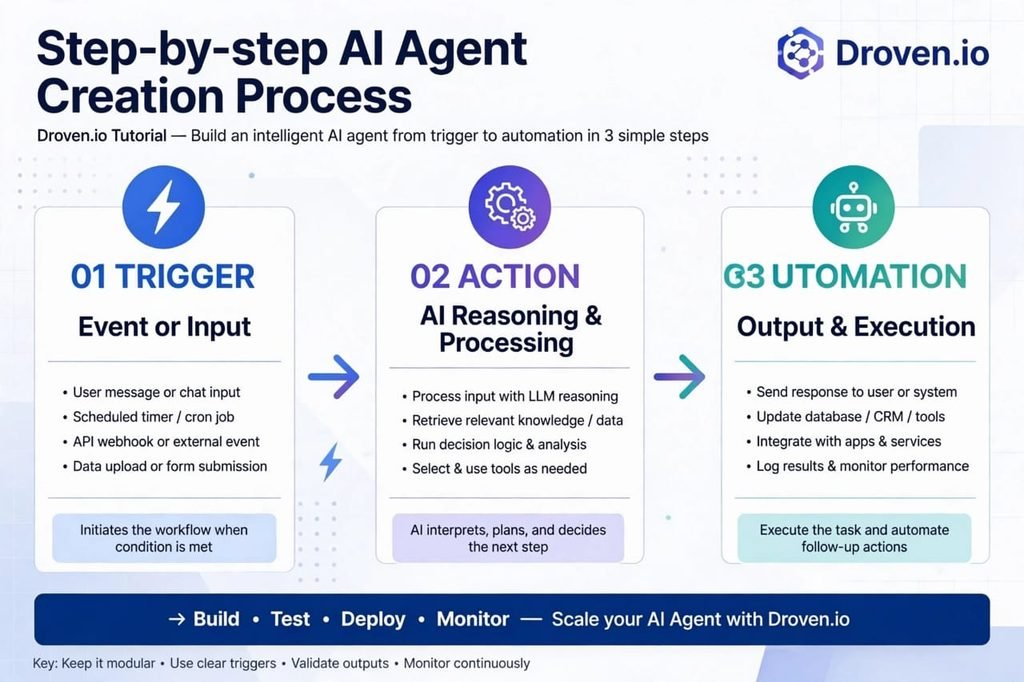
A new page will open where you have to build your agent. There are two main concepts you must understand here: Trigger and Action.
What is Trigger? When Will The Work Start?
Trigger is the event that will start your automation. You can think of a trigger as an alarm clock or a starting point. Without a trigger, your agent will never know when to start working.
Let me give you some very practical examples of triggers that I personally use:
- When a new email arrives in my Gmail inbox that contains the word “Support” or “Help”
- When someone fills out a contact form on my WordPress website
- When a new order comes on my Shopify store
- When someone sends a message to my Slack channel
- On a schedule, like every day at 9 AM in the morning
- When a new row is added to my Google Sheets
For my very first agent, I created a trigger that says: “When I receive a new email in Gmail from a new customer who is asking about my services.” This was very useful for me because I was getting many similar inquiries.
You can select your trigger from a dropdown list. Droven.io has more than 50+ trigger options, so you will definitely find what you need.
What is Action? What Will The Agent Do?
After the trigger, comes the most powerful part: the Action. Action is what your agent will actually do after the trigger happens. This is where the real magic of AI happens.
In old tools, you could only do one simple action like “send this data there.” But in Droven.io, you can give complex, intelligent instructions in plain English.
For example, my first action was: “Read this new email carefully, understand what the customer wants, make a short summary of it in 2-3 lines, check my calendar if I am available, and then send that summary to me on Slack so I don’t have to read the whole long email.”
You can see, I gave it 3-4 tasks in one sentence, and it understood everything perfectly.
You can also add multiple actions in a sequence. Like first action: Read the email. Second action: Write a professional reply draft. Third action: Save that draft to Google Docs and send it to me for final approval before sending. This multi-step reasoning is what makes it an AI Agent, not just automation.
The best part is, you write these actions in plain, simple English, just like you are talking to a human employee. You can write something like “Behave like a polite, professional, and helpful customer support agent. Your tone should be friendly.” No coding is needed at all. Zero.
Step 3: Connect Your Tools and Integrations
You have created your agent with a trigger and action, but right now your agent is alone and has no power. To give it power, you have to connect it with your other daily tools.
In the dashboard, you will find an option called “Integrations” or “Connected Apps” or “Tools” on the left sidebar. Click on it.
There you will be amazed to see more than 200+ tools and apps. You will find Gmail, Google Sheets, Google Calendar, Notion, Slack, Trello, Asana, Shopify, WooCommerce, WordPress, Facebook, Instagram, WhatsApp, LinkedIn, and almost every popular tool you can think of.
To connect a tool, just click on its logo and then click the “Connect” button. It will ask for permission to access that tool. For example, if you connect Gmail, it will ask for permission to read and send emails on your behalf. Just click “Allow” or “Authorize”. It is 100% safe and uses official APIs.
Here is a very important tip from my personal mistake: In the beginning, connect only 2 tools. When I started, I got too excited and I connected 5 tools at once – Gmail, Slack, Sheets, Notion, and Trello. Then when my agent failed, I could not understand which tool was causing the problem. So please start small. My advice is to start with only Gmail and Google Sheets or Gmail and Slack. Once you understand how it works and your first agent is successful, then you can add more tools later. This will save you a lot of time and confusion.
Step 4: Test and Deploy – Don’t Ever Skip This Step
This is the step where 90% of beginners make a big mistake, and I also made the same mistake when I started. I was so excited that I created my agent and immediately clicked Deploy and made it live without testing it. And guess what happened? My agent sent a wrong, unprofessional reply to one of my important clients. I had to personally call the client and apologize. I was very embarrassed that day.
So please learn from my mistake and never ever skip testing.
After you create your agent with trigger and action, you will see two buttons at the bottom: “Test Run” or “Preview” and “Deploy” or “Activate”.
Always, always click on “Test Run” first. What Test Run does is, Droven.io will simulate a real-life scenario and show you exactly what your agent will do if the trigger happens in real life. For example, if your trigger is a new email, it will take one of your recent emails and show you what reply your agent would generate, what data it would add to Sheets, and what message it would send to Slack.
You will see the complete output on your screen. Read it carefully. Check if the tone is correct, if the data is correct, if it is doing what you wanted. If you find any mistake, you can go back and edit the action instruction in plain English.
If everything looks perfect and correct, only then click on “Deploy” or “Activate” or “Make Live”.
Congratulations! Your first AI Agent is now officially live and working. It will now work for you day and night, 24/7, even when you are sleeping, eating, or spending time with your family. This is the real freedom that AI automation gives you.
Droven.io Pros – What I Liked The Most After 3 Months
I have been using Droven.io for more than 3 months now for my Tech Fair Hustle website and my freelance work, so I can give you my honest pros and cons.
- 100% No-Code System: I want to repeat this because it is very important. I know absolutely zero coding. I have never written a single line of code in my life. But still, I have successfully created 4 different AI Agents that are working perfectly. Its drag-and-drop visual builder is so easy that even a 15-year-old student can use it. You just drag blocks and type in English.
- Very Intelligent and Context-Aware: This is not a dumb robot. It is very intelligent. It understands context, emotion, and tone. As I mentioned before, if a customer is angry, it replies softly. If a customer is happy, it replies with enthusiasm. It can also summarize long documents, extract important information, and make decisions based on that information. This is true AI.
- Huge Time and Money Saving: This is the biggest benefit. My daily routine work that used to take 3 hours now takes only 10 minutes. I calculated last month and I saved about 85 to 90 hours in one month. That is almost 4 full days. And in terms of money, its free plan gives you 100 tasks per month for free, which is more than enough for a beginner. I used the free plan for one and a half months before I upgraded.
- Affordable and Perfect for Small Businesses: If you compare the pricing, you will understand. Lindy AI costs $40 to $60 per month for the basic plan. Relay.app also costs around $50. But Droven.io’s paid plan starts from only $19 per month. For a small business owner, freelancer, or student from Pakistan or India, this pricing is very affordable and gives you 10x more value. This is why I recommend it to all my friends.
Droven.io Cons – What Can Be Improved (Honest Review)
As an honest reviewer, I must tell you both sides. Every tool has some flaws, and Droven.io also has a few things that can be improved. I am telling you this so you don’t get disappointed later.
- Sometimes Becomes Slow: Because Droven.io is a relatively new platform compared to Zapier which is 10 years old, sometimes when there is heavy data or many agents running at the same time, it becomes a little slow. It can take 2-3 minutes extra to execute a task. I have faced this issue 2 times in 3 months. It is not a big issue, but it happens.
- No Proper Urdu or Hindi Language Support: This is a big con for us Pakistanis and Indians. It does not understand Urdu or Hindi language very well. If you give it a command in Urdu script or Roman Urdu, it will often misunderstand it or give a wrong output. It is always better to give it commands and instructions in clear, simple English. I hope they will add Urdu support in the future.
- No Mobile App Yet: As of 2026, Droven.io does not have any dedicated mobile app for Android or iOS. You have to use it on a laptop or desktop computer via its website. The website does open on a mobile browser, but the experience is not very good and it is hard to edit agents on a small screen. If you are someone who works mostly from a mobile phone, this will be a problem for you.
- Learning Curve for Complete Beginners: If you are a complete beginner who has never used any automation tool before, then the first 1-2 days will be a bit difficult for you. You will have to watch some YouTube tutorials and read their documentation to understand triggers and actions properly. For me, it took about 45 minutes to create my first successful agent. So you need a little patience in the beginning.
Final Verdict – Should You Use Droven.io in 2026?
So, after reading my 3-month experience, if you ask me, Shahid bhai, should I use Droven.io or not? My answer is a big YES, you should definitely use it.
Especially if you have a low budget, you work alone or with a small team, and most of your valuable time is wasted on small, repetitive tasks like emails, data entry, and lead follow-ups, then Droven.io is no less than a blessing for you. It will give you your time back so you can focus on growing your business.
I have personally automated my email management and lead tracking system for Tech Fair Hustle with Droven.io and believe me, my workload has been reduced by more than 50%. Now I have more time to write articles and make videos for you guys.
However, if you are a very large enterprise or a big company that has to handle thousands of customers at the same time and you need 100% perfect, military-grade reliability, then you might want to look at more expensive enterprise tools like Lindy AI or Relay.app.
But for 95% of small businesses, freelancers, bloggers, and students, Droven.io is more than enough.
My final personal advice is: Don’t just read this article. Take action today. Go to Droven.io, sign up for its free forever plan. It will not cost you a single rupee. Just take out 10 minutes from your day and create one very small and simple agent. For example, create an agent that says “When I get a new email, send its summary to my Slack.” Once you see it working with your own eyes, you will understand its power and you will automatically create more advanced agents yourself.
Frequently Asked Questions – FAQs
Q1: Is Droven.io really free? How much does it cost?
Yes, its free plan is free forever. In the free plan, you can do up to 100 tasks per month, which is enough for a beginner to test everything. When your work grows and you need more tasks, you can upgrade to the paid plan which starts at only $19 per month. They also give a 14-day free trial on paid plans.
Q2: Do I need coding skills to use Droven.io?
Absolutely not. This is a 100% no-code tool. You don’t need to write a single word of code. Everything is done with simple clicks and by typing instructions in plain English. If you can write an email, you can create an AI Agent.
Q3: Is Droven.io safe and secure? Can my data be leaked?
Yes, it is very safe and secure. It keeps all your data with AES-256 bank-level encryption and it does not sell your data to any third party. It uses official APIs of Google, Slack, etc. I have been using it for 3 months for my own business emails and I have had no security issue at all.
Q4: What is the main difference between Droven.io and Zapier? Which is better?
Zapier is an old and good tool, but it only moves data from one place to another. For example, if new email comes, copy it to Sheets. That’s it. While Droven.io’s AI Agent actually reads that email, understands its meaning and emotion, makes a decision, and then takes action. So, Zapier is like a laborer who just carries things, but Droven.io is like a smart manager who thinks and then acts. For 2026, Droven.io is much better for intelligent work.
Q5: Can I do WhatsApp automation with Droven.io?
Yes, you can do it very easily. Droven.io has official WhatsApp Business integration. You can create an AI Agent that automatically replies to messages received on your WhatsApp Business number, even when you are offline. Many small businesses in Pakistan are using it for this exact purpose.
Q6: How long does it take to create the first agent?
If you are a complete beginner, it may take 20 to 30 minutes for the first time because you are learning. But after that, once you understand the system, you can create any new agent in less than 10 minutes. My second agent took only 7 minutes.
[…] is our top category. We already have 6 articles on Droven.io AI automation tools and they are performing very well. You can write about AI tools, AI automation, […]