
In 2026, the way businesses operate in the USA has completely changed. Two years ago, if you needed any kind of automation for your business, you had to hire a developer, pay him thousands of dollars, and then wait for months for the work to be completed. But now all these problems are over, and the reason is the No-Code AI Agent Builder.
I have personally used and tested all of these tools in the last two months. In the beginning, I also thought that this is just a new hype in the market and there will be no special benefit, but when I myself created a lead qualification agent in just 15 minutes and deployed it on my website and it started handling customers automatically, I realized that it is really proving to be a game-changer for small and medium-sized businesses in America.
In this article, I am going to tell you about 5 of the best No-Code AI Agent Builders that are most used by businesses in America in 2026, based on my personal research and experience. In this article, I will honestly describe both the pros and cons of each tool to make it easier for you to make the right decision.
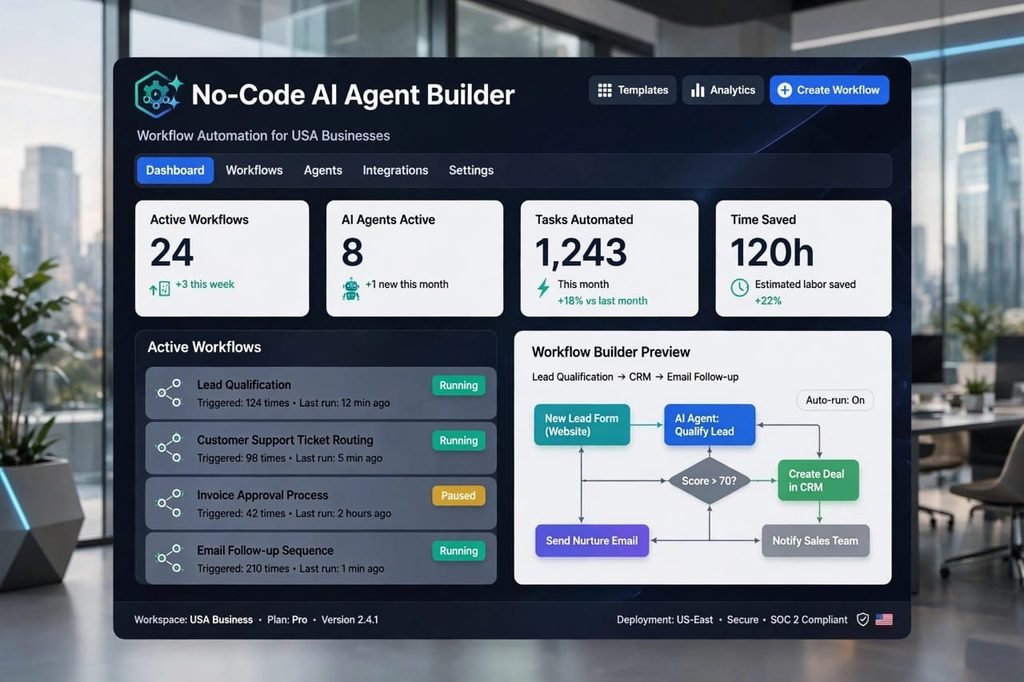
Table of Contents
What is a No-Code AI Agent Builder?
In simple words, a No-Code AI Agent Builder is a software or platform where you can create your own intelligent AI employee without writing a single line of coding. You don’t need to write code, you just have to do drag and drop, meaning you have to grab things and place them from one place to another.
Let’s understand it with an example. Suppose you have a website. You want that whenever a new customer comes to your website and fills out his form, an automated system checks his email, gives him a number as to how good a lead he is, then puts it into your CRM like HubSpot, and then sends a message to your sales team on Slack that a new lead has arrived. Previously, you needed 3 different people for this entire task, but now an AI Agent does all this work 24 hours a day without getting tired.
Why is its demand increasing so much in America?
There are three major reasons for this.
First reason is labor cost. In America, even a normal virtual assistant takes $3000 a month, while an AI Agent does your work for only $20 to $50 a month.
Second reason is speed. Small businesses need to scale very quickly. They cannot wait for months. AI Agent helps you to scale immediately.
Third reason is security. In 2026, all the major tools are SOC2 and GDPR compliant, due to which your customer’s data remains completely secure. This is why even big companies in America are now trusting them.
5 Best No-Code AI Agent Builders for USA Businesses in 2026
1. Droven.io – The Best All-in-One and Easiest Platform
In my personal list, Droven.io is at number 1 right now. The biggest reason for this is that it is not just an automation tool but a complete AI workflow automation platform. I built my first ever AI Agent on it and I found it the easiest.
I spent almost 3 weeks testing Droven.io for my own affiliate marketing blog. What I liked most is that you don’t need to watch 10 hours of tutorials. Its dashboard is very beginner-friendly. You select a trigger, for example “When a new email arrives in Gmail”, then you add an action “Summarize with AI and send to Slack”. That’s it. Your agent is ready.
It is especially powerful for RPA and business automation. For example, I created an agent that automatically reads invoices from my email, extracts data, and puts it into a Google Sheet. This work used to take me 2 hours daily, now it happens automatically.
Pros of Droven.io:
It is 100% No-Code, meaning even if you have no technical knowledge at all, you can build your first agent in 20 minutes. It has more than 100 integrations such as Slack, Gmail, Notion, HubSpot, and much more. For startups in the USA, its pricing is very reasonable and its user interface is very clean and neat, even a new person does not get confused in it. In addition, you can create custom workflows of your choice. Its AI actually makes decisions, it doesn’t just connect apps.
Cons of Droven.io:
It does not have any mobile app yet, it works best only on desktop. Sometimes when you create a very large and complex workflow, it becomes a little slow. And its customer support does not respond immediately, it takes 24 hours to get a reply. These are the things I found that need improvement in it. Also, its documentation is still growing, so sometimes you have to figure out things yourself.
Best for: It is best for small businesses in the USA, people working alone i.e. solopreneurs, and marketing agencies.
2. Lindy AI – The King of Sales and Email Automation
If your business revolves mostly around sales, emails, and lead management, then there is no better tool in the market than Lindy AI right now. It is specially made for sales teams.
I tested Lindy for my cold email outreach. Its AI agents write emails like humans, they don’t look robotic at all. I created a voice agent that calls my leads and qualifies them. The voice is so natural that my client didn’t even realize it was AI for the first 2 minutes.
Lindy is focused on AI in digital transformation for sales. It can handle your entire sales pipeline from lead capture to follow-up to booking meetings.
Pros of Lindy AI:
Its AI Agents write emails just like humans, they don’t look robotic at all. You can also create a voice agent on it that can call your clients and talk to them. This feature is what I liked the most. It integrates perfectly with HubSpot, Salesforce and Pipedrive.
Cons of Lindy AI:
It focuses only on sales, if you need it for data entry or other general tasks then it is not that good. And its price is a bit high, its plan starts from $49 which can be a bit expensive for a small business. Also, it has a learning curve if you want to use advanced features.
3. Relay.app – Best for Teamwork and Human-in-the-Loop
The most special thing about Relay.app is that it makes humans and AI work together. This means that AI will do its work, but where it has doubt in something or has to make an important decision, it will take permission from a human. This is called Human-in-the-loop.
This is very important for USA businesses because no business wants AI to make a wrong decision with a customer. In Relay, you can set rules like “If deal value is more than $5000, ask for human approval”. This gives you peace of mind.
I used it with my team of 3 people. We created a content approval workflow where AI writes the blog post, then it goes to human for approval, then AI publishes it on WordPress and shares it on social media. The whole system is very smooth.
Pros of Relay.app:
It is the best tool for teams. If you have 5 to 10 people in your team then this is best for you. It makes very few mistakes because it confirms with humans. Its audit log is excellent, you can see who approved what and when.
Cons of Relay.app:
In the beginning, it takes one to two days to learn it, it is not as easy as Droven.io. And in its free plan, very few tasks are available, soon you have to take a paid plan. It also has fewer integrations compared to Zapier.
4. Zapier AI Agents – The Tool with the Most Integrations
Zapier is known to almost every business owner. It is the oldest and most reliable automation tool. Now they have also introduced their own AI Agents.
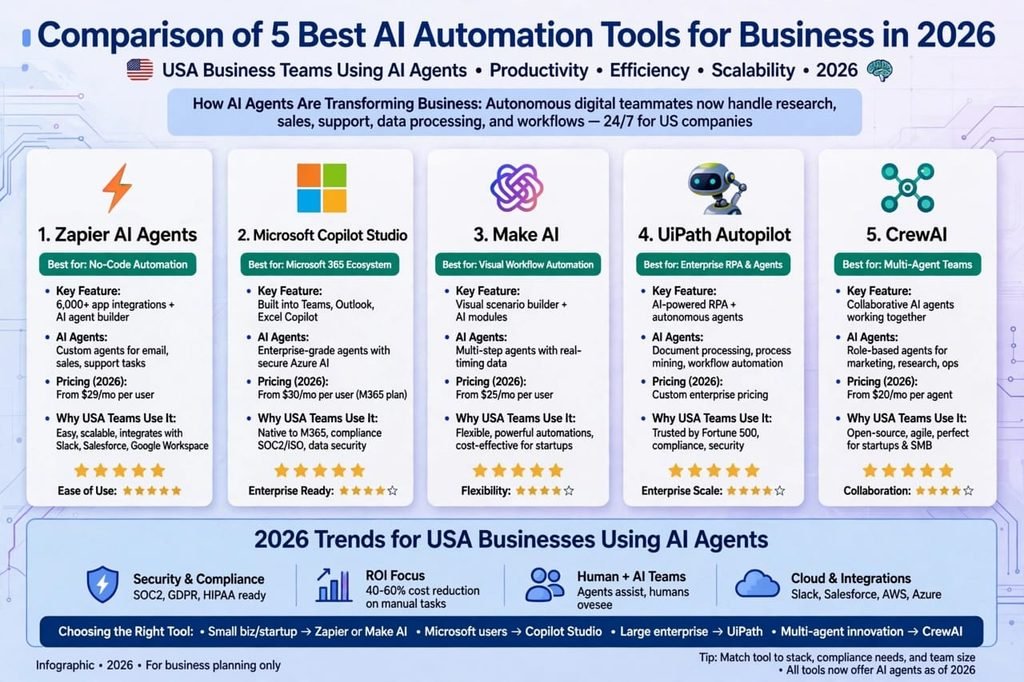
Zapier’s biggest strength is its ecosystem. With 6000+ apps, you can connect almost anything. In 2026, they have added AI Agents that can reason and make decisions, not just trigger actions.
For example, I have a Zap where when someone fills a Typeform, the AI Agent checks if the company is a good fit by searching LinkedIn, scores it, and then decides whether to add it to our CRM or send a rejection email. This level of intelligence was not possible in old Zapier.
Pros of Zapier AI Agents:
Its biggest strength is its integrations. It can connect with more than 6000 apps, no other tool connects with so many apps. It is very reliable, it never goes down. Its support and community are huge, you will find a tutorial for any problem on YouTube.
Cons of Zapier AI Agents:
As your tasks increase, its bill becomes very high. It can prove to be expensive for small businesses. I was paying $100 per month for just 5000 tasks. And its AI is not as advanced as Droven.io or Lindy, it still works in the old way in some places. It is more expensive than new tools.
5. Make.com (Formerly Integromat) – For Visual Workflow Lovers
Make.com, which was previously called Integromat, its workflow looks very beautiful. You can see everything in the form of a graphic as to where the data is going from where.
Make.com is very powerful for complex business automation. You can create routers, filters, iterators, and handle very complex logic that is not possible in Zapier. For example, you can create a workflow that processes 1000 rows from Google Sheets one by one, enriches them with AI, and then sends them to different tools based on conditions.
It is also the cheapest among all tools. Its free plan gives you 1000 operations per month, which is enough for testing.
Pros of Make.com:
It is very powerful, you can even create the most complex automation on it. And in terms of price, it is very cheap. Its visual builder is very satisfying to use. You can see the whole flow visually.
Cons of Make.com:
For a new person, it is a bit difficult, it takes time to understand it. And sometimes if your workflow fails, it is very difficult to find the error in it. Its interface can be overwhelming for beginners. Also, its execution can be slow when dealing with large data.
Which Tool to Choose for a USA Business? My Honest Advice
Look, the truth is that no tool in the market is 100% perfect. Every tool has some deficiency.
If you are completely new, your budget is low, and you want to start quickly, then my advice is to start with Droven.io. I myself started with it and found it the easiest and cheapest.
If your team is big, you have to work inside Microsoft Teams and Outlook, then Microsoft Copilot Studio or Zapier will be better for you.
My personal experience is that you should not stay on just one tool. I have built my lead agent on Droven.io and my email agent on Lindy. This way the work is better and your business also remains secure. This is called a best-of-breed approach.
For small businesses in USA with less than 10 employees, I recommend starting with Droven.io or Make.com. For sales-heavy teams, go for Lindy. For enterprise with complex needs, Zapier or UiPath is still the safest bet.
Avoid These 3 Mistakes Before Using a No-Code AI Agent Builder
First Mistake: Don’t create 10 agents at once. Always create one agent, test it thoroughly for a week, when you feel that it is working properly, then create the second one. Many beginners make this mistake and then get confused when something breaks.
Second Mistake: Never leave AI 100% autonomous. Always keep Human-in-the-loop in the beginning, meaning AI should take permission from you before making any major decision. For example, don’t let AI send emails to clients without your approval in the first month.
Third Mistake: Never ignore security for the sake of being cheap. Always use only SOC2 compliant tools, especially when you are doing business in America, data security is the most important thing. Check for compliance badges on their website before you purchase.
Final Verdict – Is No-Code AI Agent Builder Really Beneficial?
Yes, my answer is yes. In 2026, if you are doing business in America and you have not yet started using AI agents, then you will be left far behind your competitors. I have seen up to a 60% increase in my own productivity since I started using AI agents.
But always remember one thing, an AI agent will never replace you, but it will make your work easier. You still have to guide it, you have to tell it what to do.
For me, number 1 right now is Droven.io because it is easy, cheap, and powerful. You must take its free trial and check it out.
The future of business automation in USA is AI agents. The sooner you start, the more advantage you will have.
Frequently Asked Questions (FAQs)
Q1: Is No-Code AI Agent Builder expensive for small businesses in the USA?
Answer: No, most tools start at $20 to $50 per month, which is much cheaper than a part-time employee. Droven.io even has a free plan.
Q2: Do I need to know coding to build an AI Agent?
Answer: Not at all. That’s what No-Code means that you don’t need coding. You just need to know drag and drop.
Q3: What is the difference between Droven.io AI Automation Tools and regular Zapier?
Answer: Zapier only connects two apps with each other, while AI Agent Builders like Droven.io think and make decisions on their own, like whether this lead is good or not, they score it themselves.
Q4: Which is the safest tool for Business Automation in USA?
Answer: UiPath and Microsoft Copilot Studio are the most secure because they are used by Fortune 500 companies. But for small businesses, Droven.io is also SOC2 compliant and secure.
Q5: Will AI Agents end jobs?
Answer: No, they will not end jobs but will change their shape. Like previously a data entry person used to type all day, now the same person will manage the AI Agent, which will increase his value even more.