

I will be honest with you. Running a small business in 2026 is not easy. You have to reply to customers, write content, post on social media, send emails, manage invoices, and follow up with leads, all at the same time. And most small business owners do not have a big team. Most of us are doing everything ourselves, or with just one or two helpers.
That is exactly why I started testing AI automation tools. I was tired. I was spending 4 to 5 hours every day on repetitive work that was not really growing my business. I wanted to find tools that could actually save my time, not just look fancy in ads.
So for the last few months, I tested many popular AI automation tools in my real business. I paid for them with my own money. I used them for content, for customer replies, for emails, and for daily workflow. Some tools impressed me a lot. Some tools disappointed me badly.
In this honest review, I will share the best AI automation tools for small business in 2026. I will tell you what each tool is good at, what its problems are, how much it costs, and which one is right for you. This is not a sponsored list. This is my real experience.
Table of Contents
What Is AI Automation And Why Best AI Automation Tools for Small Business Matter?
AI automation means using artificial intelligence to do repetitive tasks automatically, without you doing them manually every time.
For example, when a new customer fills a form on your website, an AI tool can automatically send them a welcome email, add their details to your sheet, send you a notification, and even reply to their common questions. You do not have to sit and do all that manually.
For a small business, this is a game changer. Because time is your biggest asset. If you save 2 hours every day, that is 60 hours in a month. You can use that time to talk to customers, to improve your product, or to simply rest and avoid burnout.
But there is one important truth. AI automation does not mean you can stop working. It means you stop wasting time on boring tasks, and you focus on important work that only a human can do, like building trust, solving real problems, and making decisions.
How I Tested These Tools?
Before we go to the list, let me tell you how I tested, so you know this review is honest.
I did not just read their websites. I used each tool for at least 2 to 3 weeks in my real work. I tested them for writing, for automation, for customer support, and for ease of use. I also checked their support speed, because when you are stuck, support matters a lot.
I looked at five things for every tool: ease of use, quality of output, automation power, pricing, and customer support. Based on that, I have made this list.
1. Zapier – Best For Connecting Apps Without Coding
Zapier is one of the oldest and most trusted automation tools. It connects more than 6,000 apps together.
What I Liked About Zapier
Zapier is very simple to use. You do not need any coding knowledge. You just select, if this happens, then do that. For example, if someone fills a Google Form, then automatically add them to Mailchimp and send a Slack message.
I used Zapier to connect my website form with Gmail and Google Sheets. It worked smoothly. It almost never failed. And the number of integrations is huge. Almost every popular app is available on Zapier.
What I Did Not Like
The main problem is pricing. The free plan is very limited. As soon as your business grows and you need more tasks, the price goes up quickly. For a very small business, it can feel expensive.
Also, Zapier is not a content creation tool. It is only for automation. You will still need a separate AI writer if you want to write content.
Best For: Beginners who want to automate simple tasks between apps without learning coding.
My Rating: 4.3 out of 5
2. Make (Formerly Integromat) – Best For Advanced Automation
Make is similar to Zapier, but it is more powerful and more visual. You can see your whole workflow as a diagram.
What I Liked About Make
What I loved about Make is its flexibility. You can build very complex workflows. For example, you can check if a customer is new or old, then send a different email based on that. You can add filters, conditions, and multiple steps easily.
The pricing is also better than Zapier for the same number of tasks. If you do a lot of automation, Make can save you money.
What I Did Not Like
Make is not as beginner-friendly as Zapier. When I first opened it, I felt a little confused. It took me 2 to 3 days to understand how scenarios work. If you have never used automation before, you will need to watch tutorials.
Also, sometimes a workflow fails and the error message is not very clear. You have to spend time to find what went wrong.
Best For: Business owners who need advanced automation and want to save money on tasks.
My Rating: 4.2 out of 5
3. ChatGPT + AI Assistants – Best For Content And Daily Help
ChatGPT needs no introduction. Almost everyone is using it now. But for small business, it is still one of the most useful AI tools if used correctly.
What I Liked About ChatGPT
ChatGPT is amazing for ideas, drafts, and quick help. I used it to write email drafts, product descriptions, social media captions, and even replies to difficult customers. It is fast, and it understands context very well.
The new versions can also remember your style, browse the web, and help with data analysis. For a solo business owner, it feels like having a smart assistant always available.
What I Did Not Like
ChatGPT alone does not automate your business. You still have to copy and paste everything manually unless you connect it with Zapier or Make. It also sometimes gives wrong information with full confidence. I caught it giving wrong facts twice. So you must always fact-check important content.
And if you just copy and paste its output without editing, your content will sound robotic. Your customers will feel it is AI-written. You must add your own human touch.
Best For: Content writing, brainstorming, emails, and daily business help.
My Rating: 4.4 out of 5
4. Driven IO AI – Best All-In-One Tool
I have already tested Driven IO AI separately for 30 days, but I have to include it here because it is an all-in-one option.
What I Liked About Driven IO AI
The best thing about Driven IO is that it combines many tools in one place. You get a content writer, a workflow builder, a chatbot builder, and data analysis in one dashboard. You do not need to pay for 4 separate tools.
I liked its chatbot builder the most. I trained it on my website content and it answered 70 to 80 percent of customer questions correctly. That saved me a lot of time in customer support.
What I Did Not Like
The learning curve is real. The basic writing features are easy, but automation features take time to learn. In my first week, I got stuck twice. Support replied, but it took 6 to 8 hours, which felt slow.
Also, the AI content still needs human editing. It is good for first drafts, not for final publishing without checking.
Best For: Small businesses and agencies who want one tool for content, automation, and chatbot.
My Rating: 4.1 out of 5
5. HubSpot AI – Best For Marketing And CRM
HubSpot is famous for CRM, but now its AI features are very strong for small businesses.
What I Liked About HubSpot
HubSpot AI helps you manage your customers, emails, and marketing in one place. I liked its AI email writer and AI lead scoring. It tells you which leads are most likely to buy, so you can focus on them first.
If you have a team, HubSpot is very organized. Everyone can see customer history, emails, and notes in one place.
What I Did Not Like
HubSpot can become very expensive as you grow. The starter plan is okay, but the professional plans are costly for a small business in Pakistan or India. Also, it has many features that a very small business may never use. It can feel heavy if you just need simple automation.
Best For: Growing businesses that need CRM, email marketing, and AI together.
My Rating: 4.0 out of 5
6. Notion AI – Best For Organizing Work And Notes
Notion AI is not a full automation tool, but it is excellent for organizing your business.
What I Liked About Notion AI
I use Notion to manage my content calendar, my client work, and my daily tasks. Notion AI can summarize long notes, rewrite content, create action items from meeting notes, and help you brainstorm.
It is very clean and simple. If you like to keep everything organized, you will love it.
What I Did Not Like
Notion AI is not good for customer automation or chatbot building. It is mainly for internal work. You cannot use it to automatically reply to customers or to connect many apps like Zapier does. So it is a helper tool, not a complete automation solution.
Best For: Organizing content, notes, tasks, and team work.
My Rating: 4.0 out of 5
Comparison Table: Which Tool Should You Choose?
Choosing a tool depends on your main problem. Do not choose a tool because everyone is talking about it. Choose it because it solves your problem.
If your main problem is connecting apps, choose Zapier or Make. If your main problem is content writing, start with ChatGPT. If you want everything in one place, try Driven IO AI. If you need CRM and marketing, HubSpot is a good option. If you just want to stay organized, Notion AI is enough.
My advice is simple. Start with one tool. Use it for one month properly. Do not buy 5 tools at the same time. You will get confused and waste money. Master one tool first, then add another if you really need it.
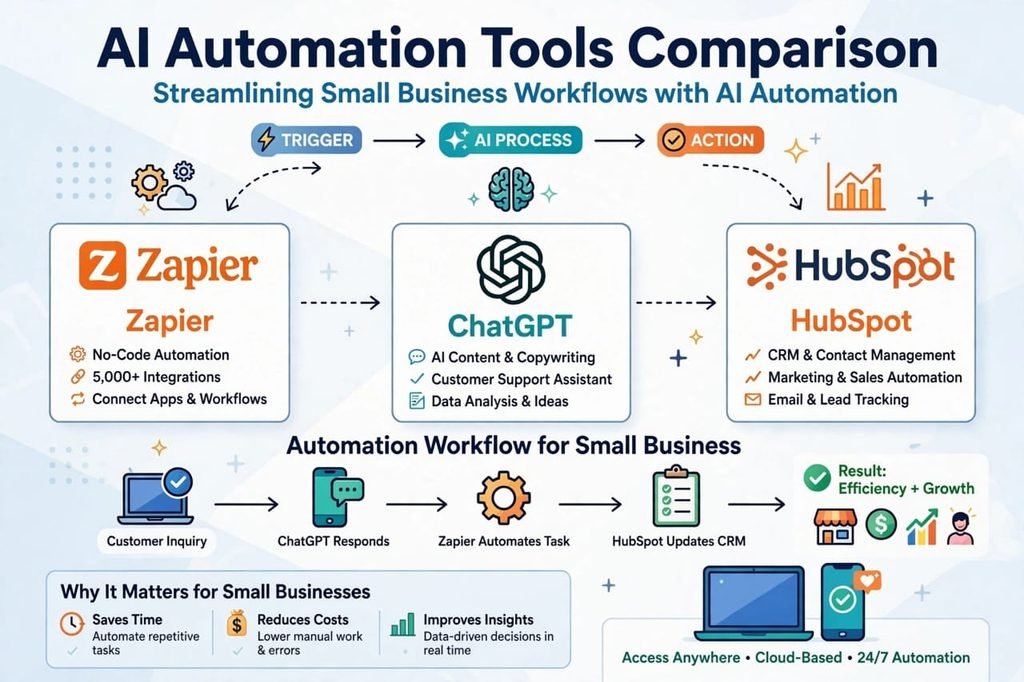
Pros And Cons Of Using AI Automation Tools
Pros: Real Benefits I Experienced
1. Huge Time Saving: I saved around 8 to 10 hours per week after setting up proper automation. That is the biggest benefit.
2. Fewer Mistakes: When a task is automated, you do not forget it. For example, a welcome email is always sent on time. No human forgets.
3. Better Customer Experience: Customers get fast replies, even at night. A chatbot can answer basic questions 24/7.
4. Lower Cost Than Hiring: Hiring one full-time employee is expensive. An AI tool costs much less and works all day.
5. More Focus On Growth: When small tasks are automated, you can focus on strategy, sales, and improving your product.
Cons: Honest Problems You Must Know
1. Learning Takes Time: Every tool needs 2 to 3 days to learn. In the beginning, you will feel slow and confused. That is normal.
2. AI Makes Mistakes: AI can give wrong facts, repeat points, or write in a robotic tone. You must always check and edit.
3. Monthly Cost Adds Up: If you buy too many tools, the monthly cost becomes high. Always check if you are actually using what you are paying for.
4. Too Much Automation Feels Cold: If you automate everything, your business can feel robotic. Customers want human connection too. Keep important conversations human.
5. Dependency On Tools: If a tool goes down or changes its pricing, your workflow can break. Always have a backup plan for important tasks.
How To Choose The Right AI Automation Tool For Your Business?
After testing all these tools, here is my simple 3-step method to choose.
Step 1: Find Your Biggest Time Waster. Write down which task takes most of your time. Is it replying to customers? Writing content? Sending follow-ups? Your tool should solve that one problem first.
Step 2: Start With Free Trial Or Monthly Plan. Never buy a yearly plan in the beginning. Use the tool for one full month in real work. If it saves you time, then continue. If not, cancel it.
Step 3: Keep It Simple. Do not build 20 automations on day one. Start with 2 or 3 simple automations. When they work well, then add more. Simple and working is better than complex and broken.
My Final Verdict: Which Tool Is Best In 2026?
After testing all these tools, if you ask me which one is the best for a small business in 2026, my honest answer is: there is no single best tool for everyone.
If you are just starting and have a small budget, start with ChatGPT and Zapier free plan. That combination will solve 80% of your problems.
If you want an all-in-one tool and you do not want to manage 4 different subscriptions, then Driven IO AI is a good option to try.
If you are growing fast and you need proper CRM and marketing, then HubSpot is worth the investment.
The best tool is the one you actually use every day. A cheap tool that you use daily is better than an expensive tool that you open once a month.
My personal setup right now is simple. I use ChatGPT for writing drafts, Make for automation, and Notion for organizing work. That combination works for me. But your setup can be different, and that is okay.
Do not buy tools based on hype. Buy them based on your real need. Test for one month, see the results, and then decide. That is the only honest way to choose an AI automation tool.
Frequently Asked Questions
Are AI automation tools good for small businesses?
Yes, if used correctly, they are very good. They save time, reduce repetitive work, and help you respond to customers faster. But they work best when you add human checking and editing.
Which AI automation tool is best for beginners?
For beginners, Zapier and ChatGPT are the easiest to start with. They are simple, have many tutorials, and you can learn them in a few days.
Can AI automation replace employees?
No, not completely. AI can replace repetitive tasks, but it cannot replace human trust, creativity, and emotional understanding. Think of AI as an assistant, not a replacement.
How much do AI automation tools cost in 2026?
Most tools start from 15 to 30 dollars per month for basic plans, and go up to 80 to 150 dollars for pro plans. Always start with a monthly plan and check the official website for latest pricing.
Is it safe to use AI tools for customer data?
Most popular tools are safe and follow privacy rules, but you should always check their privacy policy. Do not upload sensitive customer data like passwords or bank details to any AI tool.
[…] your business revolves mostly around sales, emails, and lead management, then there is no better tool in the market than Lindy AI right now. It is specially made for sales […]