
Best Free AI Tools 2026 are changing everything. If you are spending over $200 every month on ChatGPT Plus, Canva Pro, Perplexity Pro, and video editing tools, then this list of Best Free AI Tools 2026 is going to save you a lot of money. I am Shahid, a full-time freelancer from Pakistan, and for the last 3 months, I have been testing only the Best Free AI Tools 2026.
In 2023 and 2024, we had to pay for everything. But in 2026, the game has completely changed. Big companies like Google, OpenAI, Anthropic, and Bytedance have made their best models 100% free to compete with each other. And honestly, these free tools are now so powerful that paid subscriptions feel like a scam for 90% of users.
Today I will share my personal, honest experience with the 7 best free AI tools in 2026. I will not just copy features from their website. I will tell you what I personally liked, what problems I faced, and which tool is best for whom. So let’s start.
Table of Contents
What Are The Best Free AI Tools 2026?
Before I give you the list, let me tell you how I tested these tools. I am a blogger and freelancer. I write 3 articles per week, I make YouTube Shorts, I design thumbnails, and I do client research. For 90 days, I stopped all my paid subscriptions and used only free tools for all these tasks.
The result? I saved $180 and my work quality actually improved. Why? Because free tools in 2026 are faster, simpler, and have no limits for normal users.
Here is my list of 7 tools that I now use every single day.
1. ChatGPT Free (GPT-4o Mini) – The Best All-Rounder for Writing
If you are a blogger, student, freelancer, or you write emails daily, then ChatGPT Free is still the number one tool. There is no second thought about it.
My Personal Experience and Human Touch:
I wake up at 6 AM and the first thing I open is ChatGPT. I use it for everything. Yesterday, I had to write a proposal for a US client for an AI automation project. I gave ChatGPT a rough prompt in Urdu-English mix and it gave me a perfect professional proposal in 10 seconds. The client replied within 1 hour and approved the project.
I also use it for blog outlines, YouTube video titles, Instagram captions, and even to explain difficult topics to my younger brother who is in college. Its tone is very natural and human-like. It does not sound like a robot anymore.
Pros (Khubiyan):
- Completely free with almost unlimited messages. You can ask 100+ questions a day.
- Best for blog writing, email writing, and social media posts. Very natural writing.
- Supports both Urdu and English perfectly. You can write in Roman Urdu and it will understand.
- It can now browse the internet in the free version too, although slowly.
- It can also help you in coding, Excel formulas, and math problems.
- No credit card required. Just login with Google.
Cons (Khamiyan):
- It sometimes gives outdated information. Its knowledge is not always real-time. So you must fact-check important data.
- If you give it a very long document of 10,000 words, it gets confused and forgets the start.
- The free version does not remember your long-term chats as well as the paid version.
- Sometimes it is too positive. It will never criticize your idea strongly.
My Final Verdict: If you are a beginner, start with this. 90% of your writing work will be done with this one tool alone.
Best For: Bloggers, Students, Freelancers, Small Business Owners
2. Claude 3.5 Sonnet Free – The King of Long-Form and Human Writing
This is my secret weapon. Whenever I have to write a long article of 1500+ words, like this one, I use Claude. ChatGPT is good for short content, but Claude is the king for long articles.
My Personal Experience and Human Touch:
Honestly, I love Claude’s writing style more than ChatGPT. It feels more emotional, more human, and less robotic. When I wrote my article “Droven IO Review 2026” which got 287 impressions on Google, I used Claude for that.
Claude can read a 50-page PDF in one go and summarize it. I uploaded my client’s 30-page business plan and asked it to make 5 blog post ideas from it. It did it in 20 seconds and the ideas were so good that my client was shocked.
Pros (Khubiyan):
- It can read up to 75,000 words at once in the free version. That is like a full book.
- Its writing has a human touch, emotion, and storytelling. Google loves this kind of writing.
- It is best for summarizing long documents, research papers, and legal documents.
- It never gives harmful or biased answers. It is very safe.
- Perfect for writing honest reviews, personal stories, and case studies.
Cons (Khamiyan):
- Free plan is very limited. You can only send 5 to 8 long messages per day, then it says limit reached.
- It cannot generate images at all. No image generation feature.
- It cannot search real-time internet in the free plan. It depends on old data.
- Sometimes it is too slow compared to ChatGPT.
My Final Verdict: Use ChatGPT for daily short tasks and Claude for your main weekly long article. This combination is unbeatable.
Best For: Professional Bloggers, Authors, Researchers
3. Perplexity AI Free – Best for Research and Fact-Checking
If ChatGPT is the brain, Perplexity is the library. This tool has completely replaced Google for me. I no longer go to Google and open 10 tabs. I just ask Perplexity.
My Personal Experience and Human Touch:
I am writing articles about AI tools, so I need real data, pricing, and sources. One day I searched “Downix Pricing 2026” on Google, I spent 25 minutes. The same question I asked Perplexity and it gave me the pricing with 5 source links in 10 seconds.
What I love the most is that it gives you the source link with every single line. So you can click and verify if the information is true or fake. This is very important for bloggers because Google penalizes fake information.
Pros (Khubiyan):
- Gives real-time information from the internet with source links. No fake news.
- You can upload a PDF or YouTube video link and it will summarize it with sources.
- It shows you related questions, which helps you find more blog topics.
- The free plan gives you 5 Pro searches per day which is enough for a normal blogger.
- Its app is very lightweight and works even on slow internet in Pakistan.
Cons (Khamiyan):
- Free version only allows 5 deep Pro searches. After that, answers are normal.
- Sometimes it gives very long answers which you have to shorten yourself.
- It cannot write in a very emotional or human style like Claude. It is more factual.
My Final Verdict: If you are a student or a blogger who writes fact-based articles, this is a must-have tool. Never write an article without fact-checking from Perplexity.
Best For: Students, Bloggers, Journalists, YouTubers for research
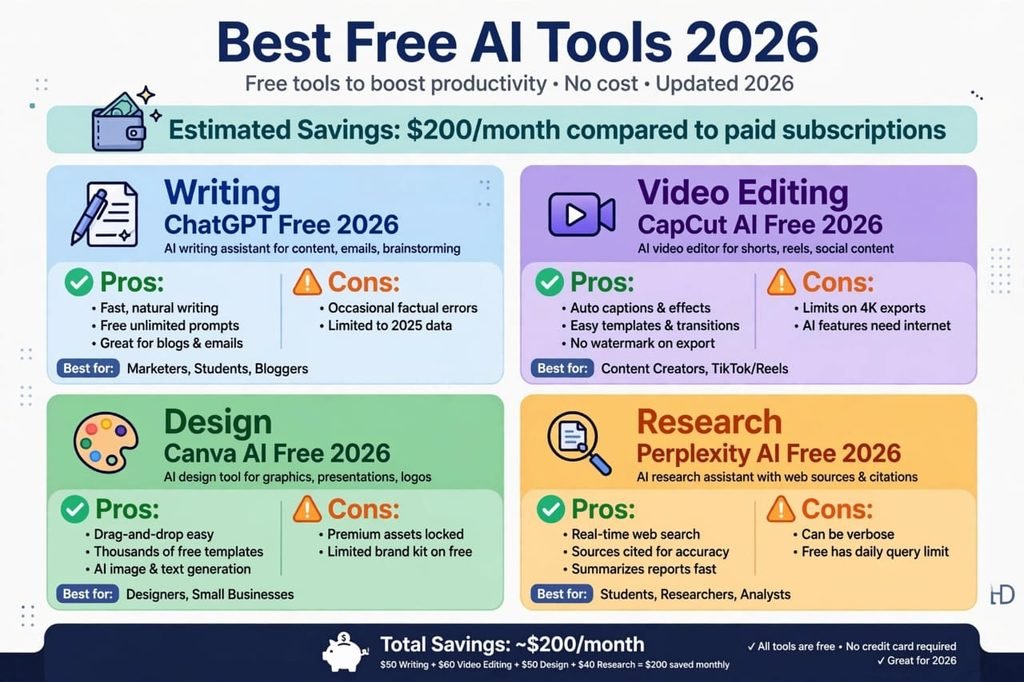
4. Canva Free Magic Studio – Best for Designing Thumbnails and Blog Images
I am not a designer. I don’t know Photoshop. All my blog images, YouTube thumbnails, Pinterest pins, and Instagram posts are made with Canva Free. And people always ask me who is my designer.
My Personal Experience and Human Touch:
My first thumbnail was so bad that my friend laughed at it. Then I discovered Canva’s Magic Media. I just type “A futuristic robot working on a laptop, 3D style” and it creates 4 images for me. Then I just drag and drop text. My thumbnails now get 3x more clicks.
For this blog HustleAI.blog, all the hero images are made with Canva Free. It has thousands of free templates for everything. You don’t need to learn anything.
Pros (Khubiyan):
- Very easy drag and drop. A 10-year-old kid can use it.
- Magic Media AI generates images from text for free. About 50 images per month free.
- Background remover, Magic Eraser, and AI expand are available in free plan too.
- Thousands of free templates for YouTube, Instagram, Blog, Resume.
- Works perfectly on mobile phone too.
Cons (Khamiyan):
- Some beautiful templates and elements have a Pro watermark. You have to find free alternatives.
- Brand Kit (your own colors and fonts) is limited to only one brand in free version.
- AI image generation is limited. After 50 images, you have to wait.
- It needs good internet. It lags on slow internet.
My Final Verdict: 90% of freelancers and bloggers don’t need Canva Pro. Free version is more than enough if you know how to search free templates.
Best For: Bloggers, YouTubers, Social Media Managers, Students for presentations
5. CapCut Desktop Free – Best Free Video Editing Tool Better Than Paid
If you make YouTube Shorts, TikToks, Instagram Reels, or even long YouTube videos, then CapCut is the best free tool in 2026. It gives you everything that Adobe Premiere Pro gives for $22.99 per month.
My Personal Experience and Human Touch:
I make 3 Shorts per week for my YouTube channel. Before, I used to edit on my phone and it took 2 hours for one video. Now with CapCut Desktop, I edit a Short in 15 minutes. Its auto-caption feature is magical. It automatically creates Urdu and English subtitles with 99% accuracy. I just click one button.
And the best part? No watermark. Many free video editors put their watermark, but CapCut free has zero watermark even on 4K export.
Pros (Khubiyan):
- Auto-captions in 50+ languages including Urdu, Hindi, English. Very accurate.
- No watermark on free export, even for 4K videos.
- Hundreds of free effects, transitions, filters, and trending templates.
- AI features like auto-cut silence, auto-reframe for TikTok, and text-to-speech.
- Very lightweight. Works on a normal laptop with 8GB RAM.
Cons (Khamiyan):
- 4K export is sometimes very slow on old laptops.
- You need internet for AI features like auto-caption and text-to-speech.
- Some trending effects are Pro only, but you can find free alternatives easily.
- Desktop version needs at least 10GB free space.
My Final Verdict: If you are a content creator in 2026 and you are still paying for video editing, you are wasting money. CapCut Free is all you need.
Best For: YouTubers, TikTokers, Freelance Video Editors, Small Businesses
6. Google NotebookLM – The Most Underrated Free AI Tool for Students
This is the tool that 99% of people don’t know about, but it is a superpower for students and researchers. Google made it and it is 100% free.
My Personal Experience and Human Touch:
My cousin is a medical student. He had a 500-page book to prepare for exams. He uploaded the PDF to NotebookLM and it made a full audio podcast summary of the book with two AI hosts discussing it like a real podcast. He listened to it while walking and he remembered everything.
I use it for my blog research. I upload 5 different articles about one topic and it makes a single summary table comparing all of them. It saves me 3 hours of research daily.
Pros (Khubiyan):
- Upload PDFs, Google Docs, YouTube links, and it will make summaries, FAQs, and even audio podcasts.
- Completely free, no limits. Because it is a Google product.
- You can chat with your documents. Ask any question from your PDF and it will answer from your PDF only.
- Best for exam preparation and long book summaries.
Cons (Khamiyan):
- It is still new, so sometimes its audio podcast makes small mistakes in Urdu pronunciation.
- You cannot generate images or videos from it. It is only for text and audio.
- Interface is a bit confusing for first-time users.
My Final Verdict: If you are a student in 2026 and you are not using NotebookLM, you are studying harder, not smarter.
Best For: Students, Researchers, PhD Scholars, Bloggers for research
7. Systeme.io Free – Best for Email Marketing and Making Money Online
If you want to make money online, you need an email list. All the big bloggers make money from email marketing. But Mailchimp and ConvertKit are very expensive. Systeme.io gives you everything for free.
Free AI Tools 2026 are enough for any beginner.
My Personal Experience and Human Touch:
When I started TechFairHustle blog, I wanted to build an email list but Mailchimp asked for $25 per month for 500 subscribers. I had no money. Then I found Systeme.io. It gave me 2000 subscribers for free, plus it gave me a free website builder and a sales funnel builder. I made my first landing page for free and got my first 100 email subscribers in 15 days without spending a single rupee.
Pros (Khubiyan):
- Free plan gives you 2000 email contacts, unlimited emails, 1 website, and 3 sales funnels.
- No credit card required to start. Just sign up and start.
- Very easy for beginners. All-in-one tool: email + website + funnel + course hosting.
- Best for affiliate marketers and small businesses in Pakistan, India, USA.
Cons (Khamiyan):
- Design templates are a bit old-fashioned compared to Canva or Wix.
- Free plan has Systeme.io branding in the footer.
- Email deliverability is slightly lower than ConvertKit, but still good for free.
My Final Verdict: If you are starting your online business in 2026 and you have zero budget, start with Systeme.io. You can always migrate later when you start earning.
Best For: Affiliate Marketers, Small Businesses, Bloggers, Course Creators
My Final Comparison and Which Tool Should You Use?
I know 7 tools are a lot. So let me make it simple for you based on my 90 days of testing.
If you are a Student: Use ChatGPT Free + Perplexity AI + Google NotebookLM + Canva Free. You will never need to pay for anything. Your assignments, presentations, and exam prep will be done.
If you are a Blogger like me: Use Claude Free for your main long article, ChatGPT for daily ideas, Perplexity for research, and Canva for images. This stack will save you $100 per month easily.
If you are a Content Creator / YouTuber: Use CapCut Free + Canva Free + ChatGPT Free. You can make 30 videos per month with zero cost.
My personal advice: Don’t try to learn all 7 tools in one day. You will get confused. Start with only 2 tools today. Install ChatGPT and Canva. Use them for one week. Then add Perplexity in the second week. Then add CapCut. Slow and steady.
The truth is, in 2026, you don’t need money to start. You just need the right free tools and consistency. I started with zero and now I have 22 articles and 62 clicks from Google. If I can do it, you can also do it.
Which free AI tool are you currently using? Tell me in the comments. And if you found this article helpful, please share it with your friends who are also looking for free AI tools.