
Updated August 5, 2026
| Editorial disclosureThis is a research-based product guide. Public product pages, pricing, legal pages, official competitor documentation, academic research, Reddit discussions, and YouTube tutorials were reviewed. Performance claims that require a logged-in account are identified as vendor-reported rather than presented as an independent hands-on test. |
Quick answer: DeckAI is an AI presentation generator positioned for consultants, operators, founders, and business teams that want to turn prompts, documents, and rough thinking into structured, visually polished slide decks. Its public website emphasizes a research-to-plan-to-generate workflow, consulting-style templates, speaker notes, web research, and export-ready output. The strongest reason to consider it is speed; the strongest reason to review the result carefully is that AI-generated facts, charts, and strategic conclusions can still require human verification.
Important keyword clarification: the search term “deck ai” is ambiguous. It may refer to a presentation generator, a gaming deck-analysis product, or other similarly named software. This article uses “Deck AI” to mean DeckAI.ai, the AI presentation and pitch-deck generator.
| Key takeawaysDeckAI currently advertises a free plan with 5 slides per month, a $30/month Pro plan with 100 slides, a $60/month Ultra plan with 250 slides, and custom Business pricing. Its public pages also promote document ingestion, a plan-first workflow, style transfer, source-cited generation, and export options. Because several capabilities are vendor-reported, buyers should test editability, export fidelity, citation quality, and brand consistency using their own material before adopting it for high-stakes work. |
In this guide
- What Deck AI is and how the workflow is designed
- Current features, plans, pricing, privacy, and security statements
- Best use cases, advantages, limitations, and alternatives
- What Reddit users and YouTube reviewers reveal about AI presentation tools
- A research-based quality checklist and ready-to-use prompts
- A clear verdict for founders, consultants, marketers, educators, and teams
What Is Deck AI?
DeckAI is an AI-powered presentation generator and pitch-deck creator. Its official homepage says the product turns dense data and incomplete logic into board-ready slides, with a generation-time claim of under two minutes and PPTX-ready output. It is presented as a tool for consultants and operators rather than as a general graphic-design suite. View the official DeckAI homepage.
The product’s positioning is important because most AI presentation tools compete on one of three ideas: fast first drafts, flexible visual design, or compatibility with established slide software. DeckAI is attempting to combine fast generation with a consulting-style narrative and professional visual hierarchy. That makes it most relevant to users preparing strategic updates, board materials, investor narratives, client recommendations, sales decks, and business reports.
What DeckAI publicly claims it can do:
- Accept PDFs, Word documents, notes, or prompts as source material.
- Create a proposed plan or storyline before generating the final slides.
- Generate consulting-oriented layouts, diagrams, and speaker notes.
- Apply a visual style from a reference or template image on supported plans.
- Produce source-cited content and export-ready deliverables.
- Offer custom brand kits and organizational support on its Business plan.
How DeckAI Works
DeckAI describes a plan-first process rather than a one-click “prompt in, slides out” workflow. The goal is to separate narrative planning from visual production, which can reduce the risk of generating a beautiful deck with the wrong story.
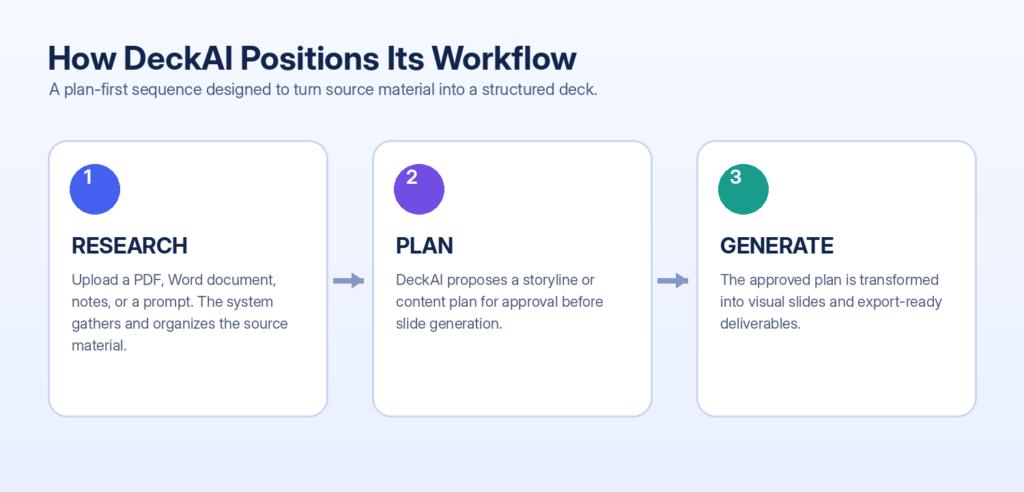
Figure 1. Research → Plan → Generate workflow, based on DeckAI’s public product explanation. Source: DeckAI About page.
1. Research and ingestion: provide a prompt, report, PDF, Word document, or rough notes. The system analyzes the available context.
2. Plan and approval: review a proposed outline or strategic storyline before visual generation begins.
3. Generate and refine: create the slide deck, inspect the content and visuals, then revise and export the result.
Source: DeckAI About page describes universal document ingestion, visual style transfer, and a plan-first architecture.
Key Features
Document-to-deck generation: Useful when the starting point is a report, brief, Word file, or messy collection of notes rather than a finished outline.
Plan-first storytelling: Allows the user to evaluate the argument, sequence, and audience fit before the system invests in visual generation.
Consulting-style templates: Aimed at strategic business communication, including executive summaries, market analysis, process diagrams, and recommendation slides.
AI diagrams and visual hierarchy: Designed to move beyond generic bullet lists by creating visual structures that support the message.
Speaker notes: The homepage lists rich speaker notes with scripts and supporting data, which can help with delivery and handoff.
Web research and cited content: The product advertises web research integration and source-cited generation; citations should still be opened and verified before publication.
Style transfer and brand kits: Ultra advertises style transfer, while the Business plan lists custom brand kits for organizational consistency.
Export options: The homepage advertises PPTX export, while the About page mentions high-resolution PDF and ZIP image exports. Users should confirm the exact output formats available in their plan and editor before purchasing.
What the Output Is Designed to Look Like
DeckAI’s public examples use executive-style headlines, structured diagrams, restrained color palettes, and information-dense layouts. That visual direction is different from web-card-heavy presentation generators that often produce a title plus several rounded boxes on every slide.
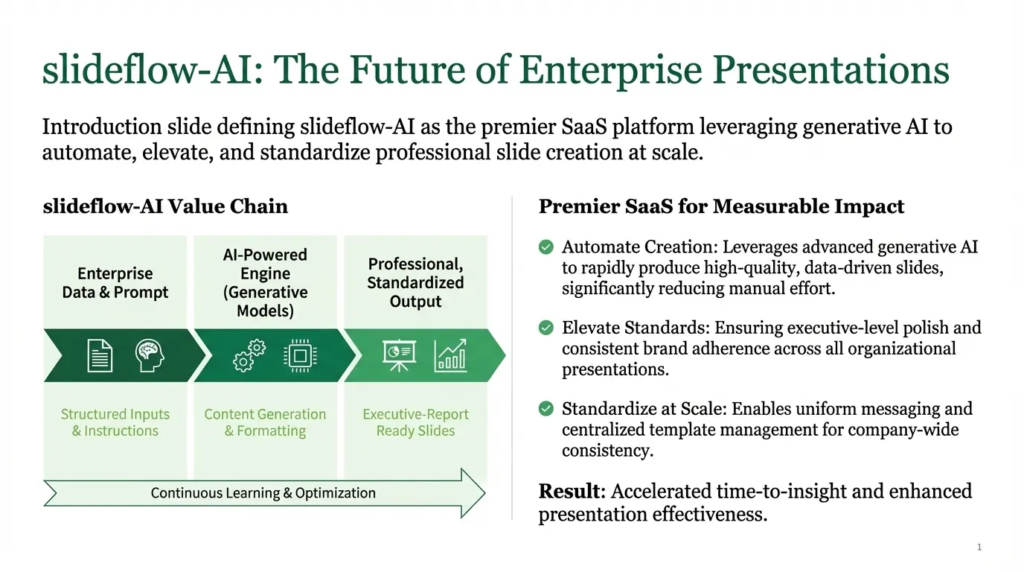
Figure 2. Official sample slide displayed on DeckAI’s homepage. Image source: DeckAI.ai. Included for product-review commentary and identification.
The sample is visually polished, but a public showcase is not the same as an independent output test. A serious evaluation should use the buyer’s own source material and then check whether the generated deck preserves exact facts, follows the requested story, remains editable, and exports cleanly.
Deck AI Pricing in 2026
Pricing below was checked against the official DeckAI pricing page on August 5, 2026. Plans and limits can change, so confirm the latest information before subscribing.
| Plan | Price | Monthly allowance | Best fit |
|---|---|---|---|
| Free | $0/month | 5 slides | Testing the workflow |
| Pro | $30/month | 100 slides | Individual creators |
| Ultra | $60/month | 250 slides | Power users and agencies |
| Business | Custom | Unlimited volume | Organizations needing brand kits and support |
Important billing details: the pricing page says unused slides do not roll over, the counter resets each billing cycle, and users can cancel while retaining access through the current billing period. Check current DeckAI pricing
Best Use Cases for Deck AI
- Consulting and strategy decks: Turn analysis, recommendations, and business evidence into a client-ready narrative.
- Board and executive updates: Condense operating reports, financial summaries, and strategic decisions into a clear sequence.
- Startup pitch decks: Structure the problem, solution, market, business model, traction, competition, and funding request.
- Sales presentations: Build discovery findings, customer pain points, solution value, proof, and next steps into a persuasive deck.
- Marketing plans: Present audience research, campaign strategy, channel mix, content plan, measurement, and budget.
- Training and education: Convert source notes or documents into organized instructional slides, subject to educator review.
- Internal project communication: Explain roadmaps, process changes, product launches, and cross-functional priorities.
How to Evaluate an AI-Generated Presentation
A strong AI deck is not simply attractive. It must be accurate, complete, aligned with the brief, visually readable, and faithful to the source material. Recent presentation-generation benchmarks evaluate these dimensions separately because a deck can look excellent while still omitting key evidence or inventing unsupported claims.
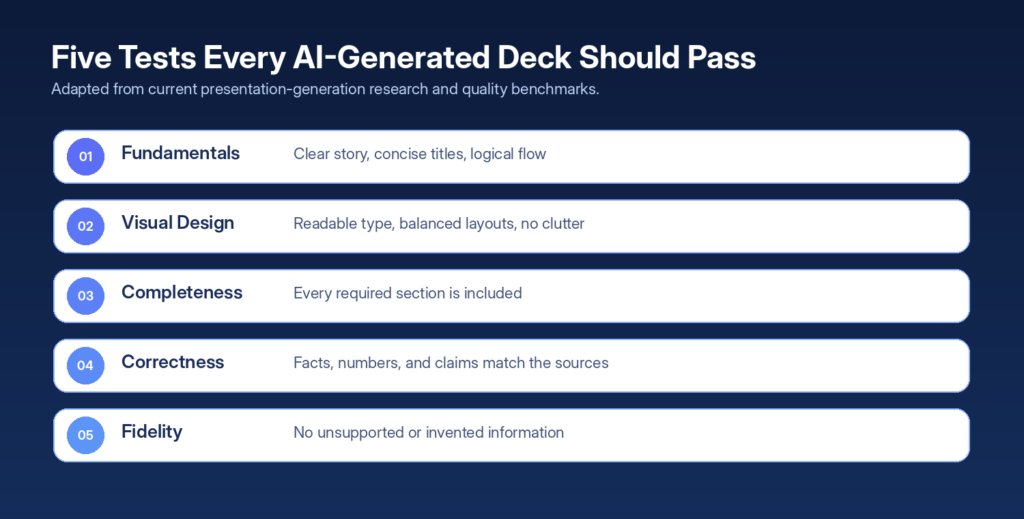
Figure 3. Quality framework adapted from PresentBench and related AI slide-generation research.
Research reference: PresentBench separates presentation fundamentals, visual design, completeness, correctness, and fidelity. Its fidelity standard treats unsupported, contradictory, or newly introduced details as hallucinations. UniPPTBench similarly emphasizes factual correctness, visual consistency, and freedom from rendering defects.
Pros and Cons
| Potential advantages | Limitations and risks |
|---|---|
Plan-first workflow can improve narrative alignment.Consulting-oriented visual positioning is relevant to business users.Document ingestion reduces the need to rewrite source material manually.Free tier provides a low-risk way to inspect the workflow.Style transfer and brand kits may support repeatable production.Speaker notes and cited research can make the deck more useful beyond the slide surface. | Public claims are not a substitute for testing with your own documents.AI can summarize incorrectly, omit context, or invent facts and citations.Image-rendered elements may be harder to edit than native PowerPoint objects.Export formats are described differently across public pages; verify plan-specific behavior.Free usage is limited to five slides per month.Confidential data requires a separate security and legal review. |
Privacy, Security, and Confidential Data
DeckAI’s public privacy policy states that the service may collect account details, usage records, IP addresses, cookies, device information, and related service data. It identifies Supabase, OpenAI, and Vercel as service providers involved in database/authentication, AI content generation, and hosting. The policy says service-use records may be retained for three years and certain ecommerce records for five years under applicable law.
The public security page says data is encrypted in transit with TLS 1.3 and at rest with AES-256, that uploaded documents are used only for presentation generation, that user data is not used to train AI models, and that generated content belongs to the user. These are vendor statements; organizations should request supporting documentation when the risk level requires it.
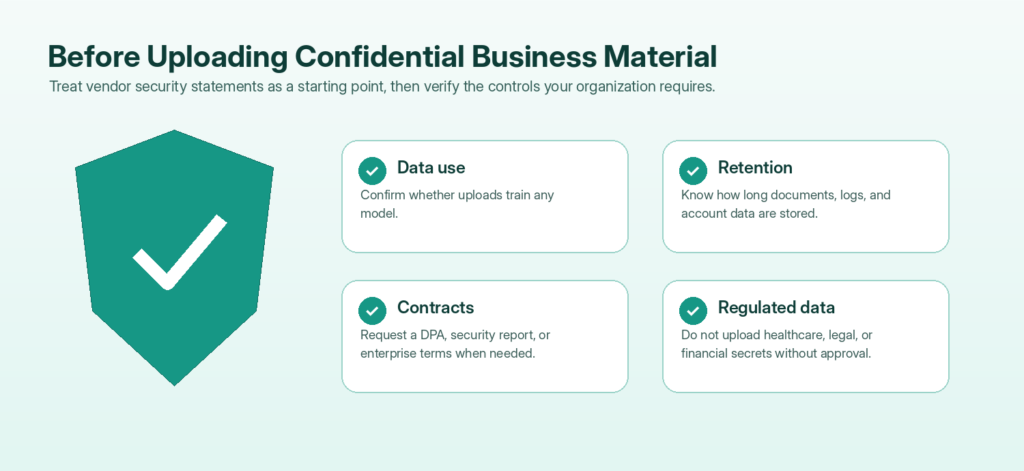
Figure 4. Practical security checklist for businesses considering an AI presentation platform.
Read the source documents: DeckAI Privacy Policy • Security & Compliance • Terms of Service
| High-stakes data ruleDo not upload non-public financials, customer data, health information, legal strategy, unreleased product details, or regulated records until your organization has approved the vendor, the data-processing terms, the retention policy, and the required security controls. |
What Reddit and YouTube Research Adds
Official product pages explain what a tool is designed to do; community discussions reveal where real workflows often break. Reddit threads about AI presentation software repeatedly mention generic content, fixed templates, heavy editing, weak brand alignment, and the importance of editable PowerPoint output. Those comments are anecdotal rather than scientific evidence, but they are useful for building a practical test plan.
Community source: r/PowerPoint discussion on AI presentation tools includes user concerns about generic output and the amount of manual editing required. Another discussion argues that AI tools can be visually attractive while still offering less editing control than PowerPoint. Read the PowerPoint comparison discussion.
YouTube tutorials are most useful for watching the interface, generation process, editing controls, and export behavior before creating an account. They should not be used as the sole source for current pricing, privacy, or contractual claims. Useful viewing examples include:
- “I’ve Tried Top 10 AI Presentation Tools. These Are the Results!” — workflow comparison and practical output commentary.
- “How to Create Pitch Decks & Presentations Using AI // Gamma” — a competitor workflow reference.
- “5 Best AI Presentation Makers” — a broader comparison of current presentation platforms.
Top 10 AI presentation tools video • Gamma pitch-deck tutorial • Five AI presentation makers
Deck AI vs. Leading Alternatives
The right tool depends less on which brand has the longest feature list and more on how the presentation will be edited, delivered, and maintained. The table below uses official product positioning rather than pretending every platform has been tested under identical conditions.
| Tool | Best suited to | Main distinction |
|---|---|---|
| DeckAI | Consultants, founders, strategy and business teams | Plan-first workflow, consulting-style layouts, document ingestion, style transfer, and vendor-reported cited research. |
| Gamma | Users who prefer web-native, scrollable, shareable presentations | Fast prompt-to-deck creation with a modern web-presentation experience. |
| Canva | Marketing teams, creators, students, and general design work | Large design ecosystem, Magic Design for presentations, brand tools, media, and flexible visual editing. |
| Beautiful.ai | Teams prioritizing brand consistency and guided layouts | Smart Slides, real-time collaboration, brand controls, analytics, and a structured AI creation process. |
| PowerPoint with Copilot | Organizations already working in Microsoft 365 | Native PowerPoint editing, file-based generation, familiar collaboration, and established enterprise workflows. |
Official comparison sources: Canva AI Presentation Maker • Beautiful.ai Presentation Maker • Microsoft Copilot in PowerPoint
Three Prompts to Test Deck AI Properly
A weak prompt asks for a presentation. A useful prompt specifies the audience, decision, source rules, narrative, slide count, and quality constraints. Use the same prompt across competing tools to make the comparison fair.
Startup investor deck
| Create a 12-slide investor presentation for a US-based B2B AI lead-generation SaaS company. Audience: seed-stage investors. Goal: secure a second meeting. Include problem, target customer, solution, product workflow, market, business model, traction, acquisition strategy, competition, financial assumptions, team, and funding ask. Use only the data I provide. Mark any missing number as ‘data required’ rather than inventing it. Keep each slide focused on one decision-relevant idea and include speaker notes. |
Board performance update
| Create a 10-slide board update from the attached quarterly report. Audience: board members. Emphasize performance versus plan, major drivers, risks, decisions required, and the next-quarter operating priorities. Every number must match the report and include a source-page reference. Do not add market statistics that are not in the source material. |
Sales proposal
| Create an 8-slide sales presentation for a US mid-market client. Audience: VP of Marketing and Head of Sales. Structure: current situation, cost of inaction, recommended solution, implementation plan, expected outcomes, proof, pricing approach, and next step. Use a confident but non-hyped tone. Avoid unsupported ROI claims and include a final assumptions slide. |
The 10-Minute Test Before You Buy
1. Use a real source document rather than a generic topic prompt.
2. Ask for a specific audience, decision, tone, and number of slides.
3. Check every statistic against the source document.
4. Open every citation and confirm that it supports the exact claim.
5. Inspect whether charts use the correct values and chart type.
6. Export the deck and test editability in the software your team actually uses.
7. Confirm that fonts, spacing, images, and diagrams survive the export.
8. Apply your brand and record how much manual cleanup is required.
9. Share the deck with a colleague who did not see the prompt and ask what the core message is.
10. Compare the total time to a manual PowerPoint workflow, including verification and cleanup—not generation time alone.
Is Deck AI Worth It?
DeckAI is worth testing when the expensive part of your workflow is turning complex business material into a coherent visual story. The free allowance is small, but it is enough to inspect the planning experience and generate a limited sample. Pro and Ultra become more attractive when a user creates decks frequently and values faster first drafts, consulting-oriented structure, or reusable visual styles.
It is less compelling when your primary need is unrestricted free design, highly detailed manual editing, native Microsoft workflows, or strict enterprise governance that has not yet been approved. It should also not be treated as an autonomous research analyst: even a source-cited deck can contain unsupported conclusions, incorrect summaries, or citations that do not fully substantiate the claim.
| Bottom lineUse DeckAI as a narrative and design accelerator, not as the final authority on facts. The best workflow is AI-assisted: provide strong source material, approve the story, verify every important claim, clean the visual hierarchy, and retain human responsibility for the final presentation. |
Frequently Asked Questions
What is Deck AI?
Deck AI, in this article, refers to DeckAI.ai: an AI presentation generator that turns prompts and documents into structured business slides and pitch decks.
Is Deck AI free?
Yes. The official pricing page lists a $0 plan with five slides per month. The allowance is intended for testing rather than frequent production.
How much does Deck AI cost?
As of August 5, 2026, Pro is listed at $30 per month for 100 slides, Ultra at $60 per month for 250 slides, and Business at custom pricing.
Can Deck AI export to PowerPoint?
The official homepage advertises PPTX export. The About page also mentions PDF and ZIP image exports. Confirm the exact export options and editability available in your plan before subscribing.
Can Deck AI create pitch decks?
Yes. Pitch decks and professional business presentations are central to its product positioning.
Can it use a PDF or Word document?
The About page says users can upload PDF reports, Word documents, and notes for analysis and restructuring.
Does Deck AI provide citations?
The product advertises source-cited content generation and web research integration. Users should still open every source and confirm that it supports the associated claim.
Is Deck AI safe for confidential documents?
The security page describes encryption, data controls, and a no-training statement for user data. A business should still complete its own legal, privacy, and security review before uploading sensitive material.
Is Deck AI better than Gamma or Canva?
It may be a better fit for consulting-style business decks and plan-first narrative development. Gamma is known for web-native presentations, while Canva offers a broader design ecosystem. The best choice depends on output format, brand control, editing needs, and governance.
Will Deck AI replace PowerPoint designers?
It can reduce time spent on outlines, first drafts, and repetitive layouts, but professional work still benefits from human judgment, fact-checking, brand refinement, and presentation strategy.
Final Verdict
DeckAI presents a focused alternative to general-purpose presentation tools. Its strongest idea is not simply AI generation; it is the attempt to combine source analysis, narrative approval, consulting-style visual production, and export-ready output in one workflow. That positioning makes it especially relevant to consultants, founders, operators, sales leaders, and marketing teams working under time pressure.
The product deserves a test, not blind trust. Use the free tier to evaluate the outline quality, factual fidelity, diagrams, speaker notes, editability, and export behavior with a real document. Verify pricing and legal terms at the time of purchase. Most importantly, keep a human reviewer responsible for every fact, number, citation, recommendation, and final design decision.
Recommended rating approach: Test before committing. Best potential fit: consulting-style business decks and time-sensitive first drafts.