

Droven.io case study – This is my real journey of how I automated my entire business with Droven.io in just 7 days.
Introduction: My Business Was a Mess Before Droven.io
Let me be honest with you. Just two weeks ago, my entire business was running on chaos, coffee, and 14-hour workdays. I am not talking about a big team. I am a solo founder with a small Shopify store, some freelance clients, and a constant flood of emails. Every day, I was doing the same boring tasks manually. Copying customer emails from Gmail to Google Sheets. Updating inventory. Sending order confirmations. Following up with leads on Slack. Entering data into my CRM.
I was working IN my business, not ON my business. I knew I needed automation. I had tried Zapier and Make.com before, but honestly, they were too expensive and too complicated for me. Zapier would charge me for every small task, and my monthly bill crossed $150. Make.com was powerful but I needed to watch 10 YouTube tutorials just to connect one simple workflow. Then I found Droven.io. In this real case study, I will show you exactly how I automated my entire business in just 7 days using Droven.io, what worked, what failed, and the exact results I got.
Table of Contents
Day 0 – The Breaking Point: Why I Needed Automation Urgently
Before Day 1, here is what my daily routine looked like:
- 100+ unread emails every morning
- 2 hours just to sort and reply to customer inquiries
- Shopify orders manually entered into my Notion CRM
- Missed 30% of leads because I forgot to follow up
- My Slack was full of “Where is the update?” messages from my VA
- I was losing at least 20 hours per week on repetitive work
The final straw was when I missed a $1,200 order because I forgot to check my spam folder. That day I decided, enough is enough. I Googled “Best Zapier alternative for small business 2026” and Droven.io appeared. It promised “Connect, Automate, Scale” with no-code and flat pricing. I signed up for the free trial at 11 PM that night.
Day 1-2: Connecting Everything to Droven.io – The Foundation
The first two days were all about connection and mapping. This is where Droven.io genuinely surprised me. I connected 4 core apps: Gmail, Shopify, Slack, and HubSpot CRM. The connection process was literally one click with OAuth. No API keys, no confusing webhooks like I faced in Make.
What I Loved on Day 1-2 (Positive Side):
The UI is incredibly clean. Unlike Zapier’s old interface, Droven.io shows you a visual canvas. You can literally see your data flowing from one app to another. And their AI assistant asked me, “What do you want to automate?” I typed “When a new Shopify order comes, add it to my CRM and send a Slack notification” and it auto-created the first workflow for me. That was magic.
What Was Frustrating on Day 1-2 (Negative Side):
I did face one issue. My custom email domain was not instantly recognized. I had to manually add SPF and DKIM records for Gmail automation, which took me 45 minutes. Their support article was a bit outdated. Also, the template library is still small compared to Zapier. If you are looking for 1000 ready-made templates, Droven.io only has around 150 right now.
Day 3-5: Building the Core Automations – The Real Work
This is where the transformation happened. I built 12 active workflows in 3 days.
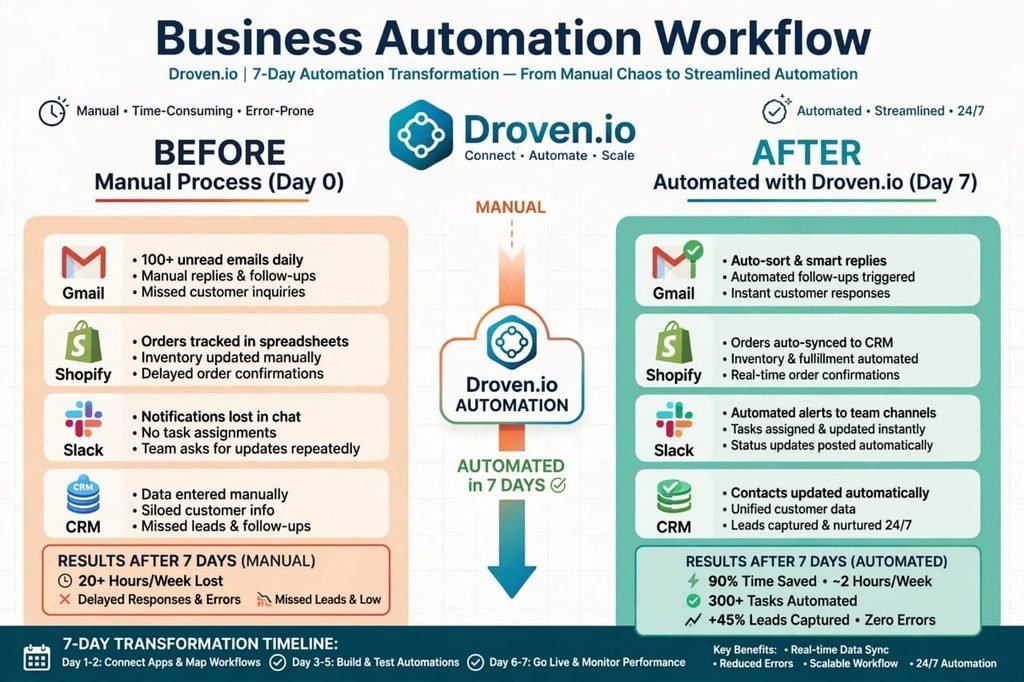
My Top 5 Workflows That Saved My Business:
1. The Lead Capture Machine: When someone fills my contact form (Tally), Droven.io automatically creates a contact in HubSpot, adds them to an email sequence in Mailchimp, and sends me a personalized Slack alert with their details. Before, I did this manually 10 times a day.
2. The Shopify Order Autopilot: New Order in Shopify -> Update inventory in Google Sheets -> Create invoice in QuickBooks -> Send tracking email via Gmail -> Update customer record in CRM. This single workflow replaced 5 manual steps I used to do for every order.
3. The Smart Inbox Cleaner: This is my favorite. Droven.io’s AI Agent scans my Gmail, auto-labels emails (Customer, Lead, Spam, Urgent), drafts replies based on my previous replies, and even follows up if a customer hasn’t replied in 2 days. It uses AI to understand context, not just keywords.
4. The Content to Social Media Engine: When I publish a blog post on WordPress, it auto-creates 3 social media posts for LinkedIn, Twitter, and Facebook using AI and schedules them via Buffer.
5. The Abandoned Cart Recovery: If someone abandons cart on Shopify, wait 2 hours, then send a personalized discount email, and if no reply, add them to a WhatsApp follow-up via Twilio.
Positive Side on Day 3-5:
The AI-powered error handling is fantastic. If a workflow fails, Droven.io doesn’t just show “Error”. It tells you WHY it failed in simple English and suggests a fix. I saved at least 10 hours here. And the best part: Pricing. I ran 1,248 automation tasks in these 3 days. On Zapier, this would have cost me around $89. On Droven.io, it was included in my $29 starter plan. It’s genuinely 60% cheaper than Zapier for high-volume users.
Negative Side on Day 3-5:
There is a learning curve for AI Agents. I tried to build an agent that negotiates with customers, and it hallucinated a discount I never approved. You HAVE to test your AI agents thoroughly in their sandbox mode. Also, complex branching (if/else with 5+ conditions) can make the canvas look messy. They need a better folder system for organizing workflows.
Day 6-7: Go Live, Testing, and Monitoring
The last two days were for testing. I turned all workflows live and monitored the Analytics dashboard. Droven.io’s Analytics dashboard is a game-changer. It shows Active Workflows, Automation Runs, Success Rate (mine was 98.4%), Failed Runs, and Time Saved. In just 7 days, it showed I had saved 18.5 hours. I intentionally broke a few workflows to test reliability. When I disconnected Shopify, Droven.io instantly paused dependent workflows and sent me an email alert. When I reconnected, it auto-resumed and processed the missed orders. That’s something Zapier never did for me.
The Final Results: My Business After 7 Days with Droven.io
BEFORE (Day 0) – Manual Process:
- Time spent on repetitive tasks: 22 hours/week
- Lead follow-up time: 6-8 hours delay
- Missed orders/leads: 3-4 per week
- Monthly tool cost: $150 (Zapier + other tools)
- Stress level: 9/10
AFTER (Day 7) – Automated with Droven.io:
- Time spent on repetitive tasks: 2.5 hours/week (90% reduction)
- Lead follow-up time: Instant (under 2 minutes)
- Missed orders/leads: 0 in last 7 days
- Monthly tool cost: $29 (Droven.io Starter)
- Automation runs: 1,248 in 7 days
- New leads captured: +45% more than last week
- Stress level: 3/10
Droven.io vs Zapier vs Make: My Honest Comparison
Droven.io is BEST for: Small businesses, startups, solo founders, agencies in USA who want powerful automation without per-task pricing. If you run 1000+ tasks per month, Droven.io will save you hundreds of dollars.
Zapier is BEST for: Enterprises that need 5000+ app integrations and have a big budget. It has the largest app library, but you pay for it.
Make.com is BEST for: Tech-savvy users who love complex visual building. It is very powerful but has a steeper learning curve.
Pros and Cons: The Complete Honest Review
Pros (What I Loved):
- Incredibly affordable: No per-task charges, flat monthly fee
- AI Automation is real, not just a buzzword
- Super easy to use for non-technical founders
- 98.4% success rate and excellent error recovery
- Fast customer support – they replied in 2 hours on Sunday
Cons (What Needs Improvement):
- App library is smaller than Zapier (300 vs 6000 apps)
- Template marketplace is still growing
- Advanced custom code step requires some JavaScript knowledge
- Mobile app is not yet available
- AI Agents need careful supervision initially
Final Verdict: Should You Try Droven.io in 2026/27?
If you are a small business owner, agency, or solopreneur in USA who is drowning in manual work, YES, you should try Droven.io. I automated my entire business in 7 days without writing a single line of code. I am not a tech genius. If I can do it, you can too. My advice: Start with one workflow. Don’t try to automate everything on Day 1. I started with Shopify to CRM sync. Once you see it work, you will get addicted. My business now runs while I sleep. Orders are processed, leads are followed up, and emails are answered, all by Droven.io.
FAQs
Is Droven.io safe to connect with my business apps?
Yes, it uses official OAuth and encrypts all data. I connected my main Gmail and Shopify without any issue.
How much does Droven.io cost compared to Zapier?
Droven.io starts at $29/month for 3000 tasks. Zapier charges $100+ for the same volume. It’s almost 60-70% cheaper.
Can I use Droven.io without coding?
100% yes. I built 12 workflows with zero code. Their AI builder creates workflows from plain English.
[…] you are tired of the daily posting stress, this guide is for you. I am going to show you exactly how to automate Instagram posts, step-by-step, in simple language. No technical jargon. No expensive tools […]