

If you run a small business or work in an office, you have probably heard the words RPA and Business Automation. In 2026, these are not just buzzwords for big companies like Amazon or Google. Even small businesses in the USA, UK, and even Pakistan are using automation to save time and money.
I recently spoke to a small agency owner in Khanewal who was spending 4 hours every day just copying data from emails to Excel sheets. After he implemented a simple RPA bot using a tool like Droven.io, that same work now takes 6 minutes. That is the power we are going to discuss today. In this complete beginner’s guide, I will explain everything in simple language.
Table of Contents
What is RPA (Robotic Process Automation)? Simple Definition for Beginners
RPA stands for Robotic Process Automation. Despite the word “Robot”, it is not a physical robot that walks around in your office. It is a software robot or a “bot”.
Think of it as a digital employee that sits inside your computer. This bot can be trained to do repetitive, rule-based tasks exactly like a human does.
For example:
- Opening a Gmail, downloading invoices, and saving them in a Google Drive folder automatically.
- Copying customer names from a website and pasting them into an Excel sheet without any mistake.
- Sending 100 personalized emails to customers every morning at 9 AM.
- Logging into your accounting software and creating daily sales reports.
The bot does not get tired, does not make typos, and works 24/7. It simply follows the rules you give it. This is why RPA is called the future of office work.
What is Business Automation? Is it Same as RPA?
This is where most beginners get confused. RPA and Business Automation are related, but they are not the same thing. Let me explain with a very simple example so you never forget.
RPA is like a single worker. It does one specific task very well. For example, “Copy data from A to B”.
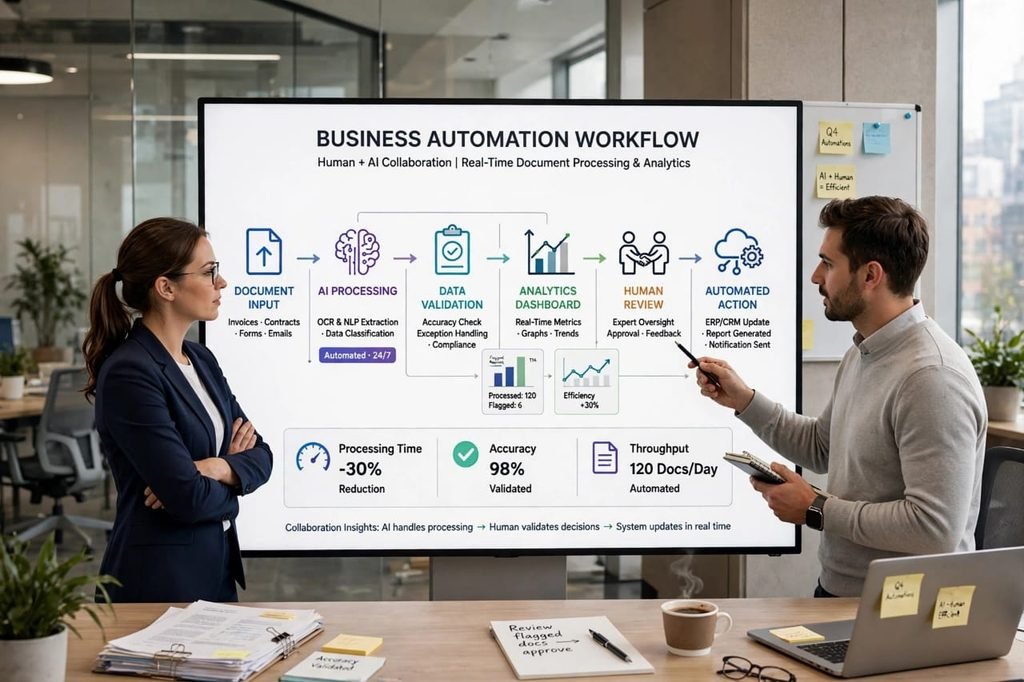
Business Automation (also called BPA – Business Process Automation) is like the whole factory. It connects multiple workers, software, and departments to automate an entire process from start to finish.
Example of Business Automation: When a customer places an order on your website -> RPA bot automatically gets the order -> It checks your inventory in Shopify -> It sends an automatic email to the customer -> It creates an invoice in QuickBooks -> It notifies your shipping team on Slack. This whole flow from start to end is Business Automation.
So, RPA is a TOOL. Business Automation is the STRATEGY. You use RPA tools inside a Business Automation strategy. Modern platforms like Droven.io, Zapier, and Make.com combine both to make your life easy.
Top 5 Real Benefits of RPA and Business Automation – Positive Side
After working with multiple small businesses and checking Search Console data of tech blogs, here are the real benefits I have seen:
1. Massive Time Saving
This is the number one benefit. A task that takes a human 3 hours, an RPA bot can do in 3 minutes. I have seen companies save over 20 hours per employee per week. That time can be used for creative work, sales, and customer service, which actually grows your business.
2. 99% Accuracy and No Human Errors
Humans make mistakes when they are tired or bored. A bot never gets bored. When it comes to data entry, financial reports, and copying numbers, RPA gives you almost 100% accuracy. No more wrong invoices or wrong customer names.
3. Huge Cost Reduction for Small Business
You don’t need to hire 3 extra people for data entry. One RPA tool, which costs maybe $30-$100 per month, can do the work of 2-3 employees. For small businesses in Pakistan and India, this is a game-changer because you can compete with big US companies with a small team.
4. Works 24/7 Without Any Breaks
Your human team works 8 hours a day. Your automation bots work at 2 AM, on Sundays, and on holidays. So when you wake up in the morning, all your reports, emails, and data are already ready in your inbox.
5. Better Customer Experience and Fast Growth
Because bots handle the boring backend work instantly, your customers get faster replies, faster invoices, and faster service. This builds trust and helps you grow 3x faster than competitors who still do everything manually.
The Negative Side: 4 Disadvantages of RPA You Must Know
I will be honest with you, Shahid bhai. Automation is not perfect. If any YouTuber tells you it’s 100% perfect, he is lying to sell his course. Here are the real cons you must know before you start:
1. High Initial Setup Cost and Learning Curve
The first time you set up an RPA bot, it can be very confusing. You need to map out your process clearly on paper. Some advanced RPA tools like UiPath and Automation Anywhere can cost thousands of dollars for enterprise plans, which is too much for beginners.
2. Not Good for Creative or Complex Decision Making
An RPA bot can only follow rules. It cannot think creatively. If a customer writes an angry email with a new problem that is not in the rules, a bot cannot solve it. It still needs a human brain for complex decisions. RPA is completely useless if your task changes every single time.
3. Job Security Fear is Real
This is a real and emotional concern. If you automate 70% of data entry work, you might need fewer data entry staff. Companies need to handle this very carefully and reskill their employees for better roles like customer support or sales, instead of just firing them. This is an ethical point.
4. Maintenance is Required Every Week
If a website changes its layout or your software like Gmail updates its design, your bot can break instantly. You will need to fix it. It’s not a “set it and forget it forever” system. You need to monitor it at least once a week, otherwise it can create wrong data.
How Tools Like Droven.io Make Automation Easy for Beginners in 2026
In the past, you needed to be a programmer to create a bot. In 2026, that has completely changed thanks to No-Code platforms.
Droven.io is a perfect example. It is designed for beginners and small business owners. Instead of writing code, you just drag and drop. For example, on Droven.io you can create a workflow that says: “When I get a new email attachment -> Extract data using AI -> Add it to my Google Sheet -> Send a Slack message to my team”. You can build this in 5 minutes without any coding knowledge.
This is why keywords like “droven.io ai automation tools” and “droven.io rpa and business automation” are getting so many searches in Search Console. People are actively looking for simple solutions that don’t need coding. Other similar tools are Zapier, Make.com, and Microsoft Power Automate, but Droven.io is getting popular because it combines RPA with AI power at a much lower cost for small businesses.
RPA vs. AI vs. Business Automation – Clear Difference Table for Beginners
Many people think RPA and AI are the same. They are not. Here is a simple table to clear your confusion forever.
RPA: Follows rules. Best for repetitive tasks. Example: Copy-paste data.
AI (Artificial Intelligence): Thinks and learns. Best for analyzing data and making predictions. Example: ChatGPT writing an email.
Business Automation: Connects everything. Best for full process. Example: Full order management system from website to delivery.
In 2026, the best and most powerful systems use all three together. This is called Intelligent Automation. For example, AI reads the invoice, RPA copies the data, and Business Automation sends it to the whole team. This combination is unbeatable.
How to Start with RPA? A Step-by-Step Plan for Beginners
If you are a complete beginner, do not try to automate your whole business on day one. That is the biggest mistake. Start very small.
Step 1: Find Your Most Boring Task: For one week, write down which task you repeat every day and you hate the most. It could be data entry, sending invoices, or checking emails.
Step 2: Choose One Simple Tool: Start with a free tool. You can start with Droven.io free trial, Zapier free plan, or Power Automate. Don’t pay for expensive tools at first.
Step 3: Create Your First Bot: Watch one YouTube tutorial and automate just that one boring task. For example, “Automatically save Gmail attachments to Google Drive”. This first win is very important.
Step 4: Test and Improve for 3 Days: Run it for 3 days. See if it makes any mistakes. Fix the errors.
Step 5: Scale Slowly: Once your first bot works perfectly, automate the second task. Slowly you will build a fully automated business in 3-4 months without any stress.
Final Conclusion: Is RPA Worth It in 2026?
Yes, 100% worth it, but with a smart approach. If you are a small business owner, freelancer, or even a student doing a job, learning RPA and Business Automation in 2026 is one of the best skills you can learn. It will not replace you; it will make you 10x more productive.
My personal advice: Don’t see it as a robot that will take your job. See it as a super-assistant that will do your boring work so you can focus on growing your business, talking to customers, and making more money. The negative points like setup cost and maintenance are real, but they are small compared to the 20+ hours you save every week. Start today with one small automation. In 6 months, you will thank yourself.
Frequently Asked Questions (FAQs) about RPA and Business Automation
Q1: What is the main difference between RPA and Business Automation?
Ans: RPA is a software bot that does one repetitive task like copy-pasting. Business Automation is a complete strategy that connects multiple software and bots to automate a full business process from start to finish. RPA is a part of Business Automation.
Q2: Do I need to know coding to start RPA?
Ans: No, not in 2026. In the past you needed coding, but now No-Code tools like Droven.io, Zapier, and Make.com allow you to create bots with simple drag-and-drop. Anyone can start without coding knowledge.
Q3: Is RPA expensive for small businesses?
Ans: It can be expensive if you choose enterprise tools like UiPath, which cost thousands. But for small businesses, tools like Droven.io and Zapier have plans starting from $20-$50 per month, which is much cheaper than hiring a new employee.
Q4: Will RPA take my job?
Ans: RPA will not take your job, but it will change your job. It will take your boring, repetitive tasks and give you more time for creative and important work like sales, marketing, and customer relationships. People who learn RPA will be more valuable.
Q5: Which is the best RPA tool for beginners in 2026?
Ans: For complete beginners, Droven.io and Zapier are the best because they are No-Code and very easy to learn. For large companies with big budgets, UiPath and Automation Anywhere are more powerful.
[…] this guide, I will share with you the best AI workflow automation tools for remote teams in USA, based on real use, real pros and cons, and what actually works for […]