
Software testing basics for beginners means learning the fundamentals of software testing, understanding the major testing types and levels, and practicing writing test cases and bug reports with a real login-page example.
By Zulqarnain Zilli | Last reviewed: July 27, 2026 | Beginner level
| Quick answerSoftware testing is the structured process of evaluating software and related work products to discover defects, reduce risk, and determine whether the product meets specified requirements and user needs. It includes planning, designing tests, preparing data and environments, executing checks, reporting defects, and communicating quality information. |
Key Takeaways
- Testing is broader than clicking through screens: it includes analysis, planning, design, execution, reporting, and learning.
- No single test type can prove that software is defect-free; teams combine levels, techniques, and perspectives to manage risk.
- Manual testing is valuable for exploration, usability, and rapidly changing work, while automation is valuable for repeatable, stable, high-volume checks.
- A good test case is specific and repeatable; a good bug report makes the failure easy to reproduce, understand, and prioritize.
- Beginners should build fundamentals first, then practice API, database, browser, and automation skills through a documented portfolio project.
Table of Contents
- 1. What Is Software Testing?
- 2. Why Software Testing Matters
- 3. Testing, QA, and Debugging
- 4. Seven Principles of Testing
- 5. Levels of Software Testing
- 6. Major Types of Software Testing
- 7. Manual vs Automation Testing
- 8. Software Testing Life Cycle
- 9. Core Test Design Techniques
- 10. Practical Login-Page Project
- 11. Writing a Useful Bug Report
- 12. Essential Tools for Beginners
- 13. Security, Accessibility, and Performance Basics
- 14. 30-Day Learning Roadmap
- 15. Common Beginner Mistakes
- 16. Frequently Asked Questions
- 17. Conclusion and References
1. What Is Software Testing?
The ISTQB Glossary describes testing as a process within the software development lifecycle that evaluates the quality of a component or system and related work products.
In practical terms, software testing is the disciplined work of asking important questions about a product and collecting evidence. Does the feature behave as required? What happens when the user enters invalid data? Can the system recover from a failure? Is it secure, accessible, fast enough, and understandable?
Testing does not only happen after coding is complete. Testers can review requirements, user stories, designs, prototypes, code, interfaces, and release plans. Finding an unclear requirement before development is often more efficient than discovering the same misunderstanding after the feature has been built.
A test can produce a pass result, a fail result, a warning, or new information. The purpose is not to prove perfection. The purpose is to reduce uncertainty and help the team make informed decisions about quality and risk.
Verification and Validation
| Concept | Beginner-friendly question | Example |
|---|---|---|
| Verification | Are we building the product correctly according to specifications? | Reviewing a requirement, design, API contract, or code implementation. |
| Validation | Are we building the right product for the user and business need? | Checking whether checkout is understandable and completes the intended purchase journey. |
2. Why Software Testing Matters
A defect is not only a technical inconvenience. It can block revenue, expose private information, damage trust, create support costs, and prevent people from completing essential tasks. Consider an ecommerce checkout where the customer is charged but the order is not created. The code may fail for a small percentage of users, but the business impact can be severe.
Testing helps teams identify risks before users experience them. It also gives stakeholders evidence about what has been checked, what remains uncertain, and whether the product is ready for the next stage.
- Reduce the probability and impact of production failures.
- Check whether requirements and acceptance criteria are satisfied.
- Reveal unclear, missing, or conflicting requirements early.
- Protect critical user journeys such as login, payment, registration, and data recovery.
- Support safer changes by detecting regressions.
- Provide quality information for release decisions.
- Improve confidence without claiming that the product is perfect.
A Simple Risk-Based View
Testing effort should be guided by risk. A rarely used cosmetic setting does not deserve the same depth as a payment flow, health record, authentication system, or production deployment. Risk-based testing prioritizes areas by considering the likelihood of failure and the potential impact if that failure occurs.
| Practical ruleTest the most important and failure-prone user journeys first. Then expand coverage based on risk, change history, complexity, usage, and available evidence. |
3. Software Testing, Quality Assurance, and Debugging
| Activity | Primary focus | Typical owner | Example |
|---|---|---|---|
| Software testing | Evaluate the product and related work products; find defects and quality information. | Testers, developers, product teams, users | Executing login tests and reviewing results. |
| Quality assurance | Improve the processes used to prevent defects and deliver quality consistently. | Whole organization, QA leaders, engineering leadership | Improving definition-of-done and review practices. |
| Debugging | Investigate the cause of a failure and change the code or configuration. | Usually developers or engineers | Tracing why the login service returns a server error. |
A tester may help isolate a failure and provide diagnostic evidence, but debugging usually includes locating the root cause and implementing a fix. After a fix, the tester performs confirmation testing and may run regression tests to check that the change did not damage other areas.
4. Seven Principles of Software Testing
The following principles are aligned with the ISTQB Certified Tester Foundation Level syllabus and help beginners avoid unrealistic expectations.
1. Testing shows the presence of defects, not their absence. A set of passing tests provides evidence, but it cannot prove that no undiscovered defect exists.
2. Exhaustive testing is impossible. Most real systems have too many inputs, states, devices, users, and combinations to test everything.
3. Early testing saves time and money. Reviewing requirements and designs can prevent defects before they become expensive to fix.
4. Defects often cluster. A small number of complex or frequently changed components may contain a large share of failures.
5. Tests lose effectiveness when repeated unchanged. The same regression suite may stop finding new problems, so tests and data should evolve.
6. Testing is context-dependent. A banking system, game, medical platform, and marketing website need different priorities and evidence.
7. A technically correct product can still fail user needs. Software with few defects is not successful if it is confusing, inaccessible, or solves the wrong problem.
5. Levels of Software Testing
Test levels organize testing according to the object being evaluated and the purpose of the check. Terminology varies across organizations, but beginners should understand the progression from small components to complete business acceptance.
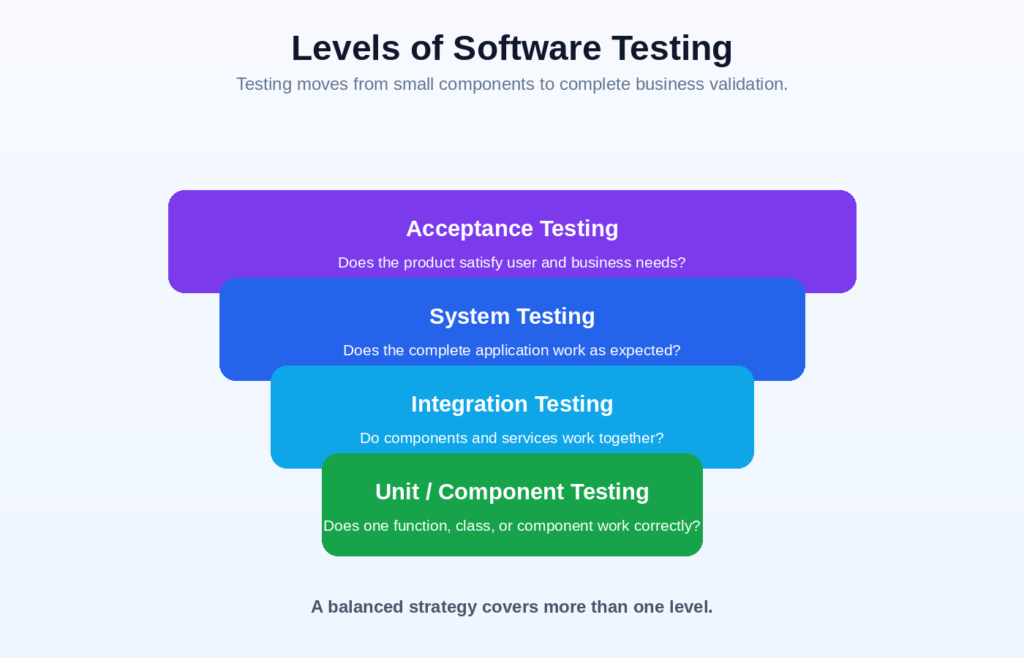
Figure 1. Original infographic: common levels of software testing.
| Level | Test object | Example question | Common participants |
|---|---|---|---|
| Unit or component testing | A small unit such as a function, class, module, or component. | Does this isolated piece produce the correct result? | Developer or technical tester |
| Integration testing | Interfaces and interactions between components, services, databases, or external systems. | Does the order service correctly call payment and inventory services? | Developers and testers |
| System testing | The complete integrated application. | Can a user complete registration, login, purchase, and confirmation? | Independent or cross-functional test team |
| Acceptance testing | Business processes, user needs, contracts, or operational readiness. | Is the product suitable for release and real-world use? | Users, customers, product owners, business representatives |
A team does not need to wait for one level to finish completely before another begins. Modern delivery often performs different levels continuously, with automated component and integration checks running alongside exploratory system testing and stakeholder acceptance.
6. Major Types of Software Testing
A testing type focuses on a particular quality characteristic or objective. Rather than memorizing a list of dozens of names, organize them into functional, non-functional, change-related, and structural perspectives.
Functional Testing
Functional testing evaluates what the system does. It checks features, business rules, calculations, data flow, permissions, and expected responses.
| Type | Purpose | Example |
|---|---|---|
| Smoke testing | A broad, shallow check that the build is stable enough for deeper testing. | Can the app launch, log in, and open core pages? |
| Sanity testing | A focused check of a specific change or small area. | Does the corrected coupon calculation now work? |
| Regression testing | Checks whether changes affected previously working areas. | Did the new checkout design break saved addresses? |
| Confirmation testing / retesting | Repeats a previously failed test after a fix. | Can the reported login defect still be reproduced? |
| End-to-end testing | Checks a complete user workflow across systems. | Can a user place an order and receive confirmation? |
| User acceptance testing | Confirms suitability for business and user needs. | Does the release satisfy agreed acceptance criteria? |
Non-Functional Testing
Non-functional testing evaluates how well the product works and whether it meets quality expectations beyond basic feature correctness.
| Type | What it evaluates | Example question |
|---|---|---|
| Performance testing | Response time, throughput, scalability, and resource use. | How does search respond under normal workload? |
| Load testing | Behavior under expected or increasing user load. | Can the site support 5,000 concurrent sessions? |
| Stress testing | Behavior beyond normal capacity and recovery after overload. | What happens when traffic exceeds the planned limit? |
| Security testing | Protection against unauthorized access, misuse, and vulnerabilities. | Can a user access another user’s data? |
| Usability testing | Ease of learning, understanding, and completing tasks. | Can first-time users complete checkout without help? |
| Accessibility testing | Use by people with disabilities and support for accessible interaction. | Can the form be completed using only a keyboard and screen reader? |
| Compatibility testing | Behavior across browsers, devices, operating systems, and configurations. | Does the layout work on mobile Safari and desktop Chrome? |
| Reliability and recovery testing | Stability over time and recovery from failure. | Does the service recover safely after a database interruption? |
Black-Box, White-Box, and Grey-Box Testing
| Approach | Knowledge of internals | Main focus | Example |
|---|---|---|---|
| Black-box testing | Little or none | Inputs, outputs, behavior, and user-visible requirements. | Enter values in a form and compare the result with the requirement. |
| White-box testing | Detailed knowledge of code or internal structure | Statements, branches, paths, conditions, and internal logic. | Design unit tests for every decision branch. |
| Grey-box testing | Partial knowledge | Behavior informed by architecture, data flow, or technical design. | Use database knowledge to design stronger API and integration tests. |
7. Manual Testing vs Automation Testing
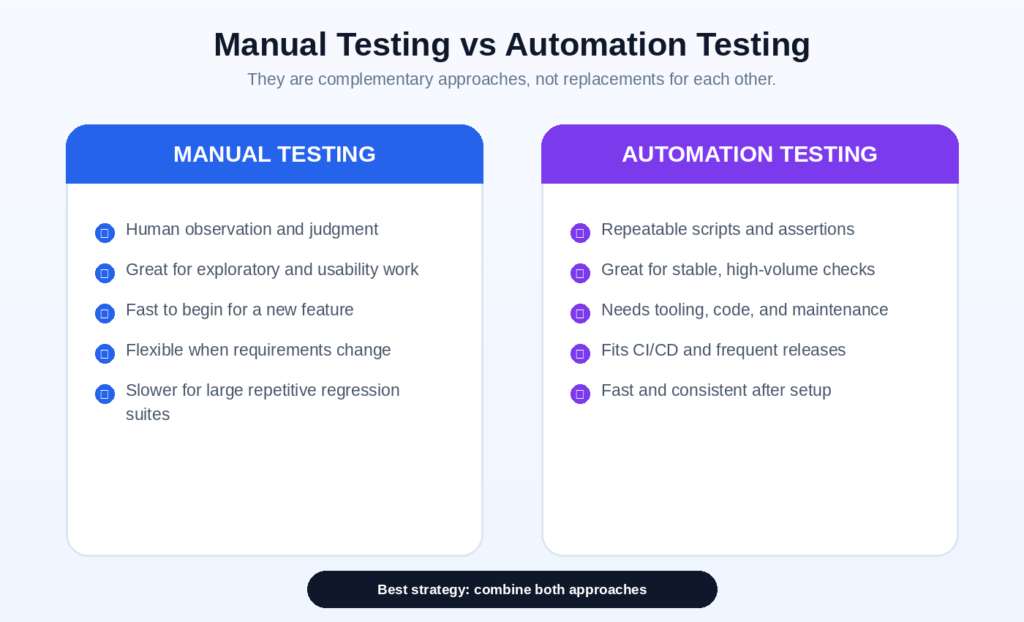
Figure 2. Original infographic: manual and automated testing are complementary.
Manual testing is performed through human interaction, observation, and judgment. Automated testing uses scripts and tools to execute checks and compare actual results with expected results. Neither approach is automatically better; the choice depends on risk, repeatability, stability, cost, speed, and the type of information needed.
| Factor | Manual testing | Automation testing |
|---|---|---|
| Best suited for | Exploratory testing, usability, visual judgment, rapidly changing features, one-time checks. | Stable regression checks, repetitive workflows, data combinations, cross-browser runs, CI/CD feedback. |
| Initial effort | Usually lower for a small feature. | Higher because scripts, data, environments, and reporting must be designed. |
| Repeat execution | Human time is required for every run. | Fast and consistent after setup, although maintenance remains necessary. |
| Strength | Human curiosity, context, and observation. | Speed, repeatability, scale, and machine-readable results. |
| Risk | Inconsistency, fatigue, slower large regression cycles. | Brittle scripts, false confidence, maintenance cost, automating the wrong checks. |
Microsoft’s current Azure Test Plans overview illustrates how planned manual testing, exploratory testing, user acceptance testing, and automated results can be managed together.
| What should be automated?Prefer stable, repeatable, business-critical checks that run frequently and have clear expected results. Keep exploratory, rapidly changing, subjective, and one-time checks primarily human-led until the value of automation is clear. |
8. Software Testing Life Cycle (STLC)
The Software Testing Life Cycle is a practical way to organize testing work. Real teams may combine, repeat, or rename phases, especially in Agile and DevOps environments, but the core activities remain useful.
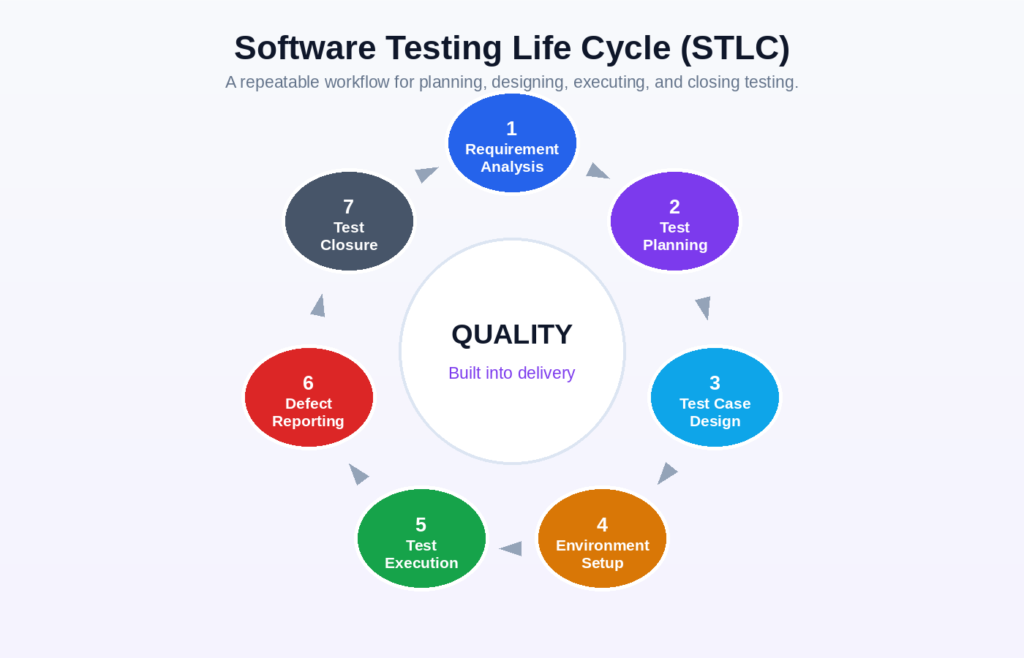
Figure 3. Original infographic: a seven-phase STLC workflow.
| Phase | Main work | Typical output |
|---|---|---|
| 1. Requirement analysis | Identify testable requirements, risks, dependencies, ambiguities, and acceptance criteria. | Requirement questions, risk list, traceability notes |
| 2. Test planning | Define scope, approach, people, environments, schedule, tools, entry and exit criteria. | Test plan or strategy |
| 3. Test design | Create test conditions, scenarios, test cases, data, and expected results. | Test cases, charters, data sets |
| 4. Environment setup | Prepare builds, devices, browsers, accounts, services, test data, and access. | Ready test environment |
| 5. Test execution | Run tests, record evidence, compare results, and investigate unexpected behavior. | Pass/fail/block results and evidence |
| 6. Defect reporting | Document failures, support triage, retest fixes, and run relevant regression tests. | Bug reports and updated status |
| 7. Test closure | Summarize coverage, open risks, defects, lessons, and release recommendations. | Test summary report and improvement actions |
Entry and Exit Criteria
Entry criteria describe what should be available before an activity begins, such as an approved build, defined requirements, working environment, and prepared data. Exit criteria describe what evidence is needed before an activity is considered complete, such as critical tests executed, unacceptable defects resolved, and known risks communicated.
Criteria should support decisions rather than become meaningless paperwork. A small product may use a concise checklist, while a regulated or safety-critical system may require formal evidence and approvals.
9. Core Test Design Techniques
Test techniques help you select useful test conditions from a very large number of possibilities. They improve coverage without attempting exhaustive testing.
| Technique | How it works | Example |
|---|---|---|
| Equivalence partitioning | Divide inputs into groups expected to behave similarly, then select representatives. | For an age field accepting 18–65, test one value below, one valid value, and one above. |
| Boundary value analysis | Focus on values at and near limits where defects frequently occur. | Test 17, 18, 19, 64, 65, and 66 for an 18–65 range. |
| Decision table testing | Model combinations of conditions and resulting actions. | Free shipping depends on membership, country, and order total. |
| State transition testing | Check behavior as the system moves between states. | After five failed logins, the account changes from active to locked. |
| Use-case or scenario testing | Test complete interactions that deliver user value. | Register, verify email, log in, update profile, and log out. |
| Exploratory testing | Learn, design, and execute tests at the same time using a focused charter. | Explore password reset for confusing messages, security concerns, and unexpected states. |
10. Practical Project: Testing a Login Page
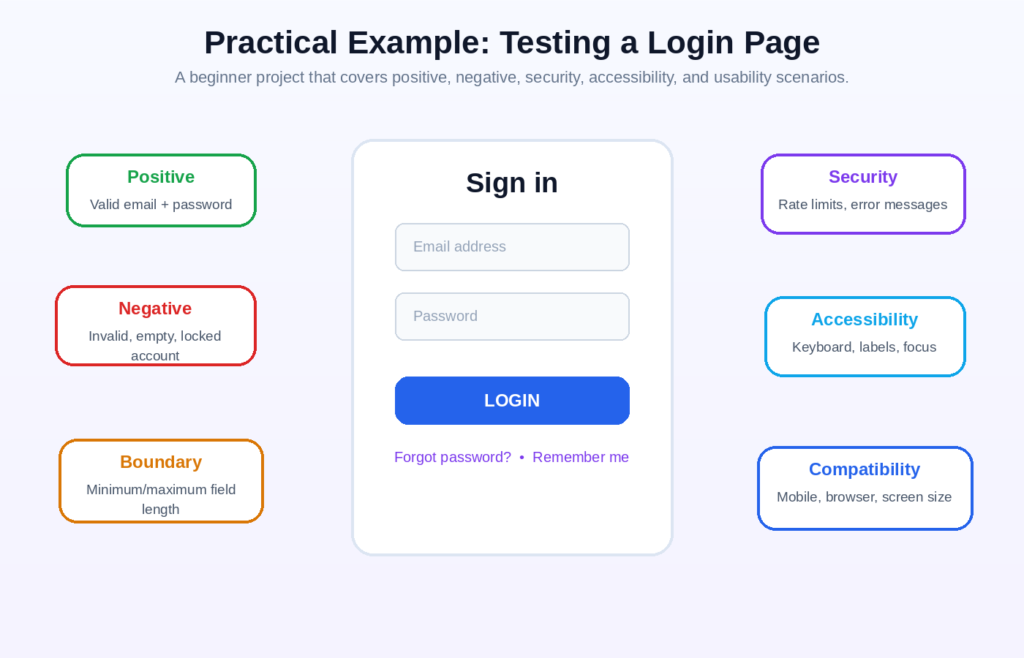
Figure 4. Original infographic: a practical login-page testing scope.
A login page is a strong beginner project because it includes validation, authentication, error handling, security, accessibility, compatibility, and usability. The goal is not merely to check that a user can sign in. The goal is to explore how the feature behaves across valid, invalid, unusual, and risky conditions.
Suggested Test Scenarios
- Log in with a registered email and correct password.
- Enter a correct email and incorrect password.
- Submit both fields empty, then one field empty at a time.
- Use invalid email formats, leading or trailing spaces, and mixed letter case.
- Check minimum and maximum supported field lengths.
- Verify that the password is masked and can be shown or hidden safely.
- Test the “Remember me” option and session expiration.
- Test the forgot-password flow, including invalid and expired links.
- Check account lockout or rate limiting after repeated failures.
- Verify that error messages do not reveal whether an account exists.
- Use keyboard-only navigation and confirm visible focus order.
- Test labels, instructions, validation messages, and screen-reader announcements.
- Check responsive behavior on small screens and common browsers.
- Test slow network, temporary server failure, and repeated clicks on the login button.
Sample Login Test Cases
| ID | Test | Precondition | Steps | Expected result | Priority |
|---|---|---|---|---|---|
| LOGIN-001 | Valid credentials | Registered active account | Enter valid email and password; select Login. | Dashboard opens; secure session starts. | High |
| LOGIN-002 | Invalid password | Registered active account | Enter valid email and wrong password. | Generic error appears; no login occurs. | High |
| LOGIN-003 | Empty fields | Login page open | Leave both fields empty; select Login. | Required-field guidance appears; request is not submitted. | Medium |
| LOGIN-004 | Invalid email format | Login page open | Enter “user@” and any password. | Email validation message appears. | Medium |
| LOGIN-005 | Trim spaces | Registered account | Enter valid email with leading/trailing spaces. | Documented normalization rule is followed. | Medium |
| LOGIN-006 | Password masking | Login page open | Type a password. | Characters are masked; toggle behaves securely. | Medium |
| LOGIN-007 | Repeated failures | Active account | Submit wrong password repeatedly. | Rate limit or lock policy activates as specified. | High |
| LOGIN-008 | Forgot password | Registered account | Request reset and open the received link. | User can create a compliant new password. | High |
| LOGIN-009 | Expired reset link | Expired token available | Open expired reset link. | Safe error and new-request option appear. | High |
| LOGIN-010 | Keyboard navigation | Login page open | Use Tab, Shift+Tab, Enter, and Space only. | Logical focus order and full operability. | Medium |
| LOGIN-011 | Mobile layout | Small-screen device | Open and complete login on mobile. | No clipping, overlap, or horizontal scroll. | Medium |
| LOGIN-012 | Slow server response | Network throttling enabled | Submit valid credentials once. | Loading state prevents duplicate submission and recovers safely. | High |
Anatomy of a Strong Test Case
- A unique identifier and a clear, specific title.
- Preconditions that define the required account, data, environment, and system state.
- Simple numbered steps that another person can repeat.
- A measurable expected result, not a vague statement such as “works correctly.”
- Test data and environment details where they affect behavior.
- Priority, risk, requirement link, and execution status when your process needs them.
- Evidence or notes for failed, blocked, or unusual results.
| Weak vs strong expected resultWeak: “Login should work.” Strong: “The user is redirected to /dashboard, the account name is displayed, and a secure authenticated session is created without exposing the password in the URL, logs, or page source.” |
11. How to Write a Useful Bug Report
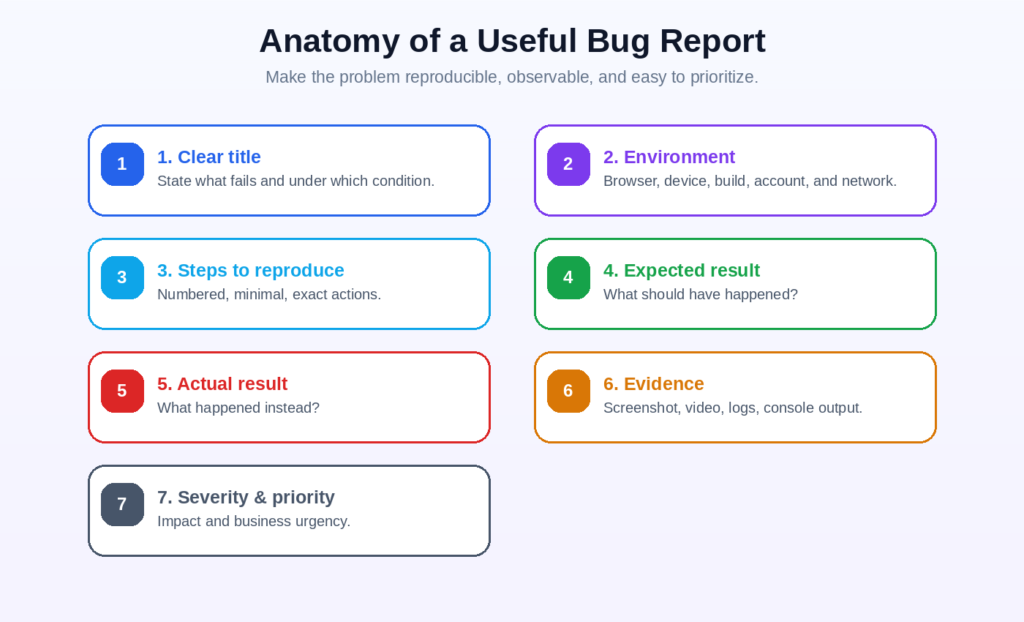
Figure 5. Original infographic: the key elements of a reproducible bug report.
A bug report is useful when another person can understand the impact and reproduce the failure without guessing. The title should describe the failure, not merely the page. “Login issue” is weak. “Login button remains disabled after valid credentials are entered” is specific.
Sample Bug Report
| Field | Example |
|---|---|
| Bug ID | AUTH-014 |
| Title | Login button remains disabled after valid credentials are entered |
| Environment | Production-like test build 2.8.0; Chrome desktop; Windows 11; test account active |
| Precondition | User is logged out and has a registered, verified account. |
| Steps to reproduce | 1) Open /login. 2) Enter valid email. 3) Enter correct password. 4) Observe and select Login. |
| Expected result | Login button becomes active after valid input and signs the user in once selected. |
| Actual result | Login button remains disabled, so the user cannot submit the form. |
| Reproducibility | 5/5 attempts |
| Severity | High — all affected users are blocked from authentication on this browser/build. |
| Priority | Urgent — blocks a critical user journey and release acceptance. |
| Evidence | Screenshot, short screen recording, browser console output, and network log attached. |
Jira commonly represents software bugs as trackable work items; see Atlassian’s Jira work item overview for the current product terminology and workflow context.
Severity vs Priority
| Concept | Question | Example |
|---|---|---|
| Severity | How serious is the technical or user impact? | A crash that loses unsaved work is high severity. |
| Priority | How urgently should the team fix it? | A spelling error on a campaign landing page may receive high priority before launch even though severity is low. |
Severity and priority influence each other but are not identical. Teams should define shared examples so testers, developers, product owners, and support teams classify issues consistently.
12. Essential Software Testing Tools for Beginners
Do not try to learn every tool at once. Select tools that support a complete workflow: document tests, inspect a web application, call an API, query data, report defects, version your work, and automate one stable user journey.
| Category | Examples | Beginner use |
|---|---|---|
| Test and issue management | Jira, Azure Test Plans, TestRail | Organize work items, test cases, executions, defects, and reporting. |
| Browser inspection | Chrome DevTools, Firefox Developer Tools | Inspect HTML, CSS, network calls, storage, console errors, and performance. |
| API testing | Postman | Send requests, inspect responses, create collections, and write assertions. |
| Web automation | Playwright, Selenium, Cypress | Automate browser interactions and repeatable end-to-end or component checks. |
| Mobile automation | Appium | Automate supported mobile application interactions. |
| Performance testing | Apache JMeter, k6 | Generate load and evaluate response time, throughput, and reliability. |
| Database skills | SQL client and a safe test database | Validate stored data, joins, updates, and backend effects. |
| Version control and CI | Git, GitHub, GitHub Actions or another CI platform | Store test code and documentation; run checks on changes. |
Official Tool Resources
Postman API testing documentation — Postman documents integration, end-to-end, regression, and performance-oriented API testing workflows.
Selenium documentation — Selenium provides browser automation components and guidance for web testing.
Playwright documentation — Playwright provides a modern browser testing framework and official getting-started material.
Cypress documentation — Cypress documents end-to-end and component testing in a real browser.
Microsoft Software Testing Fundamentals — A video-based introduction to testing methodologies, test creation, bugs, management, and automation.
13. Security, Accessibility, and Performance Basics
Security Testing
Security testing looks for weaknesses that could allow unauthorized access, data exposure, account takeover, unsafe configuration, or misuse. Beginners should not perform intrusive security testing against systems without explicit authorization. Start with your own application or a legal training environment.
For structured web-security testing methods, use the OWASP Web Security Testing Guide as an authoritative reference. Link to a versioned OWASP section when citing a specific test because the project advises that versioned links are more stable for precise references.
- Authentication and session handling.
- Authorization and access control.
- Input validation and injection risks.
- Sensitive data exposure in pages, logs, URLs, and error messages.
- Secure password reset and account recovery.
- Rate limiting and protection against repeated automated attempts.
Accessibility Testing
Accessibility testing evaluates whether people with different abilities can perceive, understand, navigate, and operate the product. Automated tools can detect some issues, but human evaluation and user involvement remain important.
The W3C Web Accessibility Initiative provides an official accessibility evaluation overview and the current WCAG 2.2 standard and supporting guidance.
- Keyboard access, visible focus, and logical focus order.
- Programmatic labels and instructions for form controls.
- Error identification and useful correction guidance.
- Color contrast and information that does not depend on color alone.
- Zoom, responsive reflow, headings, landmarks, and screen-reader announcements.
Performance Testing
Performance testing asks whether the system remains responsive and reliable under expected and extreme conditions. Begin with a measurable target: response time, throughput, concurrent users, error rate, or resource consumption. Use production-like data and environments where practical, and avoid generating load against third-party or public systems without permission.
- Baseline test: understand normal single-user or low-load behavior.
- Load test: evaluate expected and growing traffic.
- Stress test: find limits and observe recovery.
- Soak test: identify degradation, leaks, or instability over time.
- Spike test: observe sudden changes in traffic.
14. 30-Day Software Testing Learning Roadmap
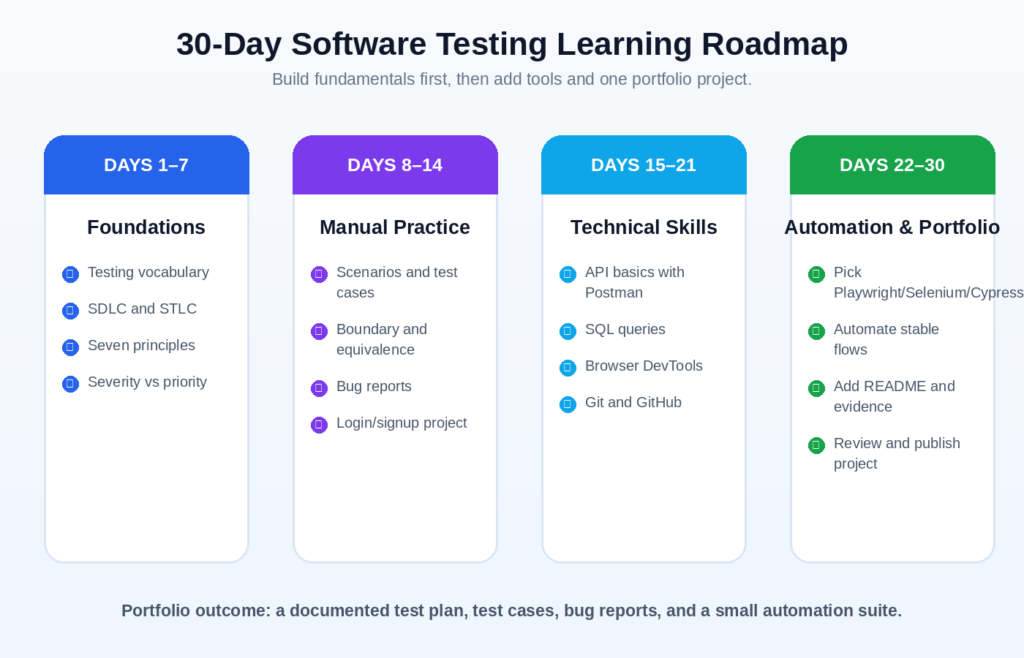
Figure 6. Original infographic: a practical 30-day beginner roadmap.
| Period | Focus | Deliverable |
|---|---|---|
| Days 1–7: Foundations | Learn testing vocabulary, SDLC/STLC, principles, levels, types, risk, severity, and priority. | Create a one-page glossary in your own words. |
| Days 8–14: Manual practice | Write scenarios, use boundary and equivalence techniques, execute tests, and report defects. | Build a login/signup test plan with at least 20 test cases. |
| Days 15–21: Technical skills | Learn HTTP basics, Postman, simple SQL, browser DevTools, JSON, and Git. | Test a public practice API and document requests, responses, and assertions. |
| Days 22–30: Automation and portfolio | Choose one language and framework; automate stable flows; add evidence and documentation. | Publish a Git repository with README, test cases, bugs, and a small automation suite. |
A Sensible Learning Order
- Understand what to test and why before learning how to automate it.
- Practice writing precise expected results and reproducible bug reports.
- Learn browser and network inspection so you can investigate beyond the visible interface.
- Add API and database skills because many failures occur between the interface and backend.
- Choose one automation stack and complete a small maintainable project.
- Learn continuous integration after your tests can run reliably on your own machine.
| Community research insightRecent software-testing community discussions commonly show beginners feeling overwhelmed by the number of languages and automation tools. The most useful pattern is to learn fundamentals, create a real test plan, and build one documented portfolio project before collecting more tools. |
Supplementary Reddit discussion: transitioning from manual to automation (community experience, not a primary technical authority).
Supplementary Reddit discussion: learning roadmap and portfolio practice (community experience, not a primary technical authority).
15. Common Beginner Mistakes
Testing only the happy path: Valid inputs are important, but failures often appear in invalid, empty, boundary, interrupted, repeated, and concurrent conditions.
Writing vague expected results: “Works correctly” cannot be measured. State the visible result, data change, status, message, or transition.
Confusing test cases with testing skill: A large test-case count does not guarantee useful coverage. Risk, observation, design, and investigation matter.
Trying to automate everything: Automation has development and maintenance cost. Automate where repeatability and frequency justify it.
Ignoring test data and environment: A failure may depend on account state, build, browser, permissions, data, time zone, or service configuration.
Reporting bugs without evidence: Provide exact steps, expected and actual results, environment, reproducibility, and relevant attachments.
Skipping accessibility, security, and mobile behavior: A function can appear correct while still excluding users or exposing serious risk.
Treating testing as the tester’s responsibility alone: Quality improves when product, design, engineering, operations, support, and users contribute evidence and feedback.
16. Frequently Asked Questions
Is coding required for software testing?
Coding is not required for every testing activity. Manual, exploratory, usability, acceptance, and requirements testing can begin without programming. Automation, advanced API work, technical diagnostics, and SDET roles usually require coding skills.
Can a complete beginner learn software testing?
Yes. Start with terminology, risk, scenarios, test cases, bug reports, and practical web testing. Then add HTTP, APIs, SQL, Git, and one automation framework.
What is the difference between QA and software testing?
Software testing evaluates products and work products to find defects and quality information. Quality assurance is broader and focuses on improving processes that prevent defects and support consistent delivery.
Which testing tool should a beginner learn first?
Begin with browser DevTools and a simple test-case or issue tracker. Add Postman for APIs, SQL for data checks, Git for version control, then choose one browser automation framework based on your project and language.
Is manual testing still useful?
Yes. Manual testing is especially valuable for exploration, usability, visual judgment, rapidly changing features, and investigations that require human context. Automation adds speed and repeatability for suitable checks.
What makes a good test case?
A good test case has a clear objective, defined preconditions, repeatable steps, specific data, and a measurable expected result. It should help another person execute the same check consistently.
What is the difference between smoke and sanity testing?
Smoke testing is a broad, shallow check that a build is stable enough for deeper testing. Sanity testing is a focused check of a specific change or area.
How long does it take to learn software testing basics?
A focused beginner can understand the core concepts and produce a small practical project in about 30 days. Professional depth develops through repeated practice across different products, risks, tools, and teams.
Should beginners learn Selenium, Playwright, or Cypress?
Any can be useful. Select one based on the language, application, team, and job market you are targeting. The ability to design maintainable tests and understand application behavior matters more than collecting multiple frameworks.
Can testing prove that software has no bugs?
No. Passing tests provide evidence about the conditions that were checked. They do not prove that no undiscovered defect exists.
17. Conclusion
Software testing basics are not a list of tool names. They are a way of thinking about quality, risk, evidence, and user outcomes. A strong beginner learns to ask clear questions, select useful tests, observe carefully, report precisely, and communicate uncertainty honestly.
Start with one realistic project. Test a login and password-reset flow, write scenarios and test cases, use boundary and state-based techniques, report a few well-documented defects, call an API, inspect data, and automate only the stable checks. That portfolio will demonstrate more practical understanding than a long list of tools without evidence of how they were used.
As your skills grow, continue learning from official documentation, experienced teams, production feedback, and real users. Testing changes with the product and context, but the goal remains consistent: provide trustworthy information that helps people build and release better software.
References and Further Reading
1. ISTQB Glossary — testing terminology
2. ISTQB Certified Tester Foundation Level Syllabus v4.0.1
3. Microsoft Learn — Software Testing Fundamentals
4. Microsoft Learn — Azure Test Plans overview
5. Postman Docs — Test API functionality and performance
6. Selenium Documentation — Overview
7. Playwright — Official documentation
8. Cypress Documentation — Why Cypress?
9. OWASP Web Security Testing Guide
10. W3C WAI — Evaluating Web Accessibility
11. W3C — Web Content Accessibility Guidelines 2.2
12. Atlassian — Introduction to Jira work items
13. Google Search Central — Creating helpful, reliable, people-first content
14. Google Search Central — Link best practices
15. Google Search Central — Article structured data